
- Home
- >
- Help
- >
- Online Store
- >
- How do I change the online ordering suggested/ "fa...

- Subscribe to RSS Feed
- Mark Thread as New
- Mark Thread as Read
- Float this Thread for Current User
- Bookmark
- Subscribe
- Printer Friendly Page
How do I change the online ordering suggested/ "favorites"?
I don't know where it pulls these favorites for: but when I click the "order online" it takes me to the menu and adds a favorites section at the top of the online ordering section.
But it's so dumb because it suggested specials that are only available certain days (not in order too!), then a side of cheese dip, and then one of our least popular sandwiches the "BBQ".
Anyone know how in the world to get rid or this? It's nowhere to be found on my end. I have tried every setting under the sun. Anyone?!?!?! Thank you for your help.
- Mark as New
- Bookmark
- Subscribe
- Subscribe to RSS Feed
- Permalink
- Report



- Subscribe to RSS Feed
- Mark Thread as New
- Mark Thread as Read
- Float this Thread for Current User
- Bookmark
- Subscribe
- Printer Friendly Page
Hi @The7onWalnut - Thanks for reaching out to us here on the Square Seller Community👋
The most popular section gets automatically generated. The popularity score is based on a combination of past orders, add to cart (but not purchased), and page views of items.
You can disable this section within the editor by going to Order Online > Item List > Arrange & add items > hover over the Most Popular section and select the button to disable and republish the website.
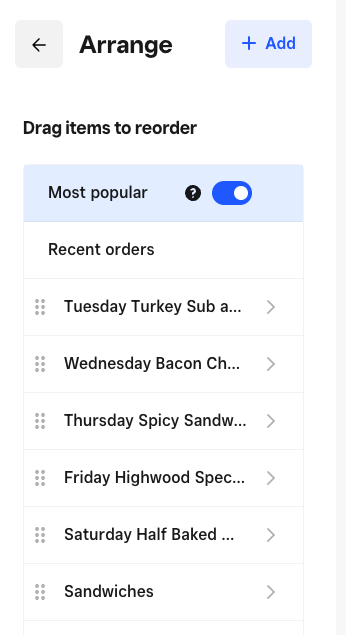
I hope this information is helpful but please do let me know if you have any additional questions.
Community Moderator, Square
Sign in and click Mark as Best Answer if my reply answers your question.
- Mark as New
- Bookmark
- Subscribe
- Subscribe to RSS Feed
- Permalink
- Report
- Subscribe to RSS Feed
- Mark Thread as New
- Mark Thread as Read
- Float this Thread for Current User
- Bookmark
- Subscribe
- Printer Friendly Page
I am not seeing this anywhere- When you say "within the editor" what exactly is that? I am on the website editor and there is no options like this that I see? I don't see an "order online".
- Mark as New
- Bookmark
- Subscribe
- Subscribe to RSS Feed
- Permalink
- Report



- Subscribe to RSS Feed
- Mark Thread as New
- Mark Thread as Read
- Float this Thread for Current User
- Bookmark
- Subscribe
- Printer Friendly Page
@The7onWalnut, Some of this does sound off, but it's difficult to pinpoint what may be happening without looking at your account with you.
The fastest way to resolve complicated Square Online questions is by reaching out to our team directly. The best way to reach out is by phone because our team can look at your account with you and help you make adjustments in real time.
If you haven't already, please reach out by phone directly by logging into your Square account and heading here.
- Mark as New
- Bookmark
- Subscribe
- Subscribe to RSS Feed
- Permalink
- Report

Square Community
Square Products