
- Home
- >
- Help
- >
- Online Store
- >
- Customer ordered 3 days in advance, prep time is 2...

- Subscribe to RSS Feed
- Mark Thread as New
- Mark Thread as Read
- Float this Thread for Current User
- Bookmark
- Subscribe
- Printer Friendly Page
Customer ordered 3 days in advance, prep time is 20 minutes. But order is not in upcoming section
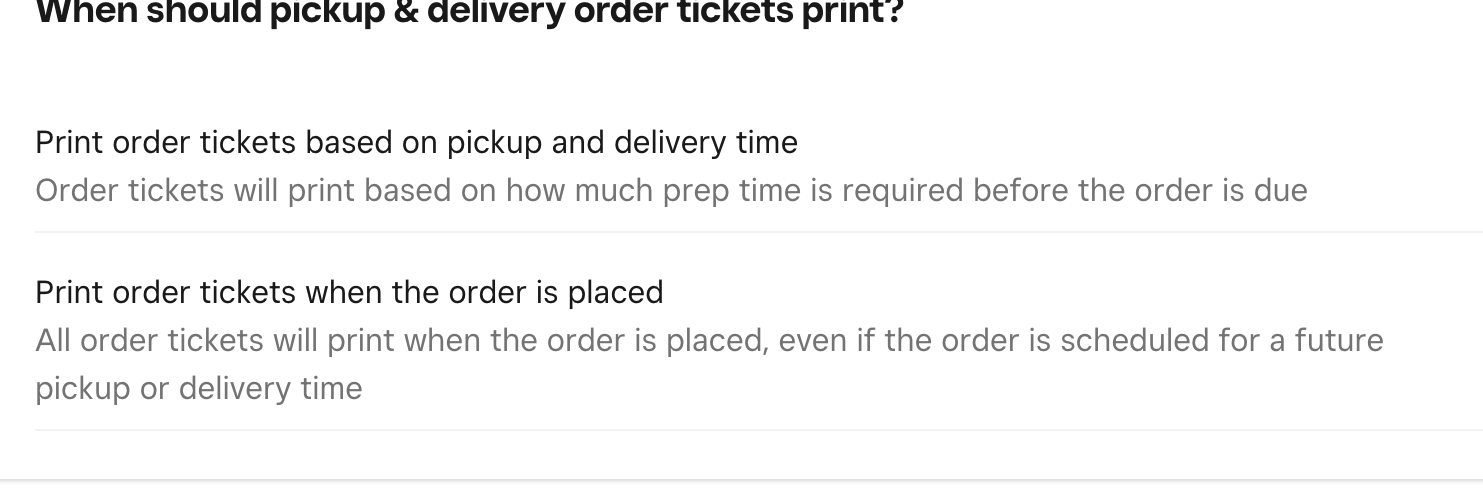
I’ve configured my online store to accept orders minimum one day in advance. I expected these orders to be queued up in “Upcoming Orders” but it’s immediately showing in “Active Orders” even though the prep time is 20 minutes. I thought the order would be in upcoming orders until the prep time is within the pickup time? I set the orders to print the order ticket immediately when customers place their order. This is going to be very confusing to our staff as we have other online orders integrated into our POS.
- Mark as New
- Bookmark
- Subscribe
- Subscribe to RSS Feed
- Permalink
- Report



- Subscribe to RSS Feed
- Mark Thread as New
- Mark Thread as Read
- Float this Thread for Current User
- Bookmark
- Subscribe
- Printer Friendly Page
Hello there @happy8 I understand how this can cause confusion with your staff. Can you check your settings under workflow on the Square Online Dashboard, do you have "print order tickets on pickup time and delivery time? Can we try selecting that option, does that help?
Square Community Moderator
Sign in and click Mark as Best Answer if my reply answers your question ✨
- Mark as New
- Bookmark
- Subscribe
- Subscribe to RSS Feed
- Permalink
- Report
- Subscribe to RSS Feed
- Mark Thread as New
- Mark Thread as Read
- Float this Thread for Current User
- Bookmark
- Subscribe
- Printer Friendly Page
Yes, I have that selected. But the printer is only printing the receipt. the receipt does not contain the CUSTOMER or PICKUP TIME. how can I update settings so it prints the kitchen order? right now it is printing a receipt with no name and no pickup time, which is useless. incredibly frustrating.
- Mark as New
- Bookmark
- Subscribe
- Subscribe to RSS Feed
- Permalink
- Report
- Subscribe to RSS Feed
- Mark Thread as New
- Mark Thread as Read
- Float this Thread for Current User
- Bookmark
- Subscribe
- Printer Friendly Page
Of course that would be frustrating, I understand and would like to get to the bottom of this. Can you confirm what printer brand and model you are using? What Square device is your printer connected to? Under your printer settings, you enabled order tickets, right?
Square Community Moderator
Sign in and click Mark as Best Answer if my reply answers your question ✨
- Mark as New
- Bookmark
- Subscribe
- Subscribe to RSS Feed
- Permalink
- Report
- Subscribe to RSS Feed
- Mark Thread as New
- Mark Thread as Read
- Float this Thread for Current User
- Bookmark
- Subscribe
- Printer Friendly Page
Star Micronics TSP143IIIBi. Square Stand. I have enabled order tickets.
- Mark as New
- Bookmark
- Subscribe
- Subscribe to RSS Feed
- Permalink
- Report
- Subscribe to RSS Feed
- Mark Thread as New
- Mark Thread as Read
- Float this Thread for Current User
- Bookmark
- Subscribe
- Printer Friendly Page
Since you have all the correct settings enabled and are still having issues I recommend contacting our Customer Support Team to investigate this further. We will need to take a further look at your pickup and fulfillment settings. For account security, we cannot discuss that information here. You can reach support at 1-855-700-6000 squ.re/contactsqsupport. If you need anything else let me know, I am happy to assist in any way I can.
Square Community Moderator
Sign in and click Mark as Best Answer if my reply answers your question ✨
- Mark as New
- Bookmark
- Subscribe
- Subscribe to RSS Feed
- Permalink
- Report
- Subscribe to RSS Feed
- Mark Thread as New
- Mark Thread as Read
- Float this Thread for Current User
- Bookmark
- Subscribe
- Printer Friendly Page
I attempted to contact using that phone number twice. All is does it redirect to me get support via chat. but chat cannot resolve it and tells me to call the number. but I call the number and it redirects me to chat. so, no one can help me fix this. I'm afraid if I am facing this much issues with getting simple questions answered, I'd rather not use Square Online
- Mark as New
- Bookmark
- Subscribe
- Subscribe to RSS Feed
- Permalink
- Report
- Subscribe to RSS Feed
- Mark Thread as New
- Mark Thread as Read
- Float this Thread for Current User
- Bookmark
- Subscribe
- Printer Friendly Page
I'm sorry to hear your support experience has been anything but smooth. In order to provide you with quicker support we offer chat support, we understand that this doesn't work for everybody. I have made some changes on the back end so if you can try contacting support again with the number you used to activate the account you can speak with support. please call within 24 hours. Our team is available 6am-6pm PST. Thank you @happy8!
Square Community Moderator
Sign in and click Mark as Best Answer if my reply answers your question ✨
- Mark as New
- Bookmark
- Subscribe
- Subscribe to RSS Feed
- Permalink
- Report

Square Community
Square Products