
- Home
- >
- Help
- >
- Online Store
- >
- Change Featured Items Shop Now Button

- Subscribe to RSS Feed
- Mark Thread as New
- Mark Thread as Read
- Float this Thread for Current User
- Bookmark
- Subscribe
- Printer Friendly Page
Change Featured Items Shop Now Button
Is there a way I can change the wording of the Featured Items "Shop Now" button? I cannot seem to change it like I could with the other buttons.
- Mark as New
- Bookmark
- Subscribe
- Subscribe to RSS Feed
- Permalink
- Report



- Subscribe to RSS Feed
- Mark Thread as New
- Mark Thread as Read
- Float this Thread for Current User
- Bookmark
- Subscribe
- Printer Friendly Page
Hi @VPG! Thanks for reaching out and welcome to the Seller Community! This is currently a feature request, but I will be sure to try and merge all similar requests to this thread to help keep all of the feedback in one place.
Let me know if you have any other questions. 🙂
Community Moderator, Square
Sign in and click Mark as Best Answer if my reply answers your question.
- Subscribe to RSS Feed
- Mark Thread as New
- Mark Thread as Read
- Float this Thread for Current User
- Bookmark
- Subscribe
- Printer Friendly Page
Hi @VPG! Thanks for reaching out and welcome to the Seller Community! This is currently a feature request, but I will be sure to try and merge all similar requests to this thread to help keep all of the feedback in one place.
Let me know if you have any other questions. 🙂
Community Moderator, Square
Sign in and click Mark as Best Answer if my reply answers your question.

- Subscribe to RSS Feed
- Mark Thread as New
- Mark Thread as Read
- Float this Thread for Current User
- Bookmark
- Subscribe
- Printer Friendly Page
I too would prefer that the button text is customizable, as I would think it is more appropriate to say "Add to Cart" as oppose to "Shop Now"
- Mark as New
- Bookmark
- Subscribe
- Subscribe to RSS Feed
- Permalink
- Report



- Subscribe to RSS Feed
- Mark Thread as New
- Mark Thread as Read
- Float this Thread for Current User
- Bookmark
- Subscribe
- Printer Friendly Page
Thanks for adding your voice here @HWM!
Community Program Manager, Square
- Mark as New
- Bookmark
- Subscribe
- Subscribe to RSS Feed
- Permalink
- Report
- Subscribe to RSS Feed
- Mark Thread as New
- Mark Thread as Read
- Float this Thread for Current User
- Bookmark
- Subscribe
- Printer Friendly Page
Your welcome
- Mark as New
- Bookmark
- Subscribe
- Subscribe to RSS Feed
- Permalink
- Report
- Subscribe to RSS Feed
- Mark Thread as New
- Mark Thread as Read
- Float this Thread for Current User
- Bookmark
- Subscribe
- Printer Friendly Page
Had this been fixed?
- Mark as New
- Bookmark
- Subscribe
- Subscribe to RSS Feed
- Permalink
- Report

- Subscribe to RSS Feed
- Mark Thread as New
- Mark Thread as Read
- Float this Thread for Current User
- Bookmark
- Subscribe
- Printer Friendly Page
Hi @Kapwa10 😊
Yes! You can now edit this button. Click on the Featured Items section on your website, then make sure the button option is toggled on. You will see a field called Label which is the text of the button.
Here is a very generic screenshot from my test site:
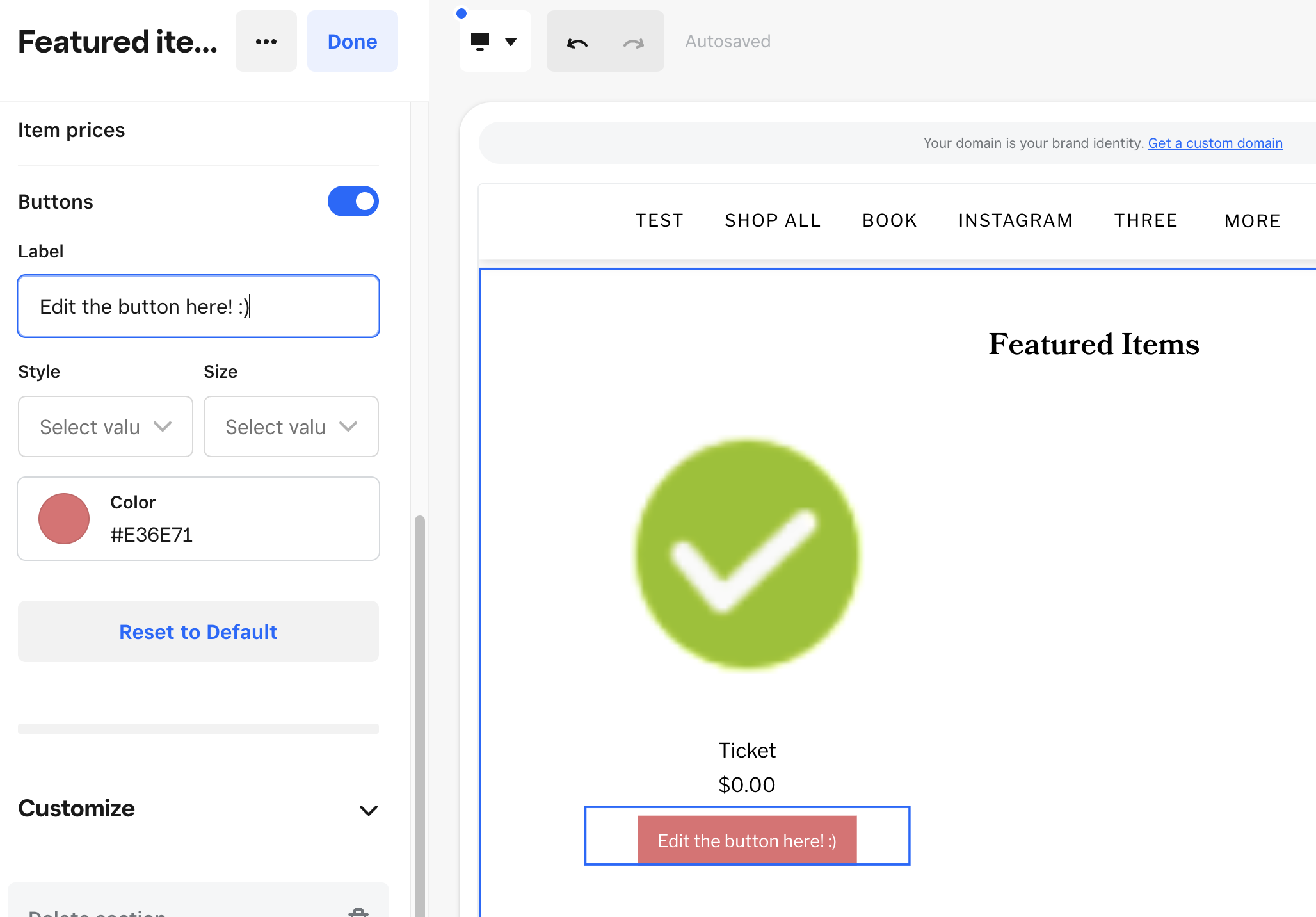
P.S. Welcome to the Seller Community! 🎉
- Mark as New
- Bookmark
- Subscribe
- Subscribe to RSS Feed
- Permalink
- Report

Square Community
Square Products