
- Home
- >
- Help
- >
- Online Store
- >
- Categories don't sync to square point of sale app ...

- Subscribe to RSS Feed
- Mark Thread as New
- Mark Thread as Read
- Float this Thread for Current User
- Bookmark
- Subscribe
- Printer Friendly Page
Why don't the categories sync from Square Online to the Square point of sale app? All the items have synced but not the categories.



- Subscribe to RSS Feed
- Mark Thread as New
- Mark Thread as Read
- Float this Thread for Current User
- Bookmark
- Subscribe
- Printer Friendly Page
Hey @rmstudio ✨
Good to see you around the Seller Community 🤓
This is a feature request that our Product Teams are aware of. As you can see in this thread, I'm not entirely sure why this setting hasn't already been created - however, I imagine it has something to do with wanting sellers to be able to customize their site and have it differ from their in-store settings if they want.
While I don't think we will ever 'force' sellers to sync their categories automatically, we are working on being able to provide sellers with the option to sync categories.
I don't have a timeline to share though, sorry about that. I'll make sure to update this thread when I hear something.

- Subscribe to RSS Feed
- Mark Thread as New
- Mark Thread as Read
- Float this Thread for Current User
- Bookmark
- Subscribe
- Printer Friendly Page
Hey @gw123!
Thanks for posting in the Seller Community ✨
The category information from your Square account does not continuously sync. However, categories can be imported one time from Square to Square Online (and will need to be managed separately, thereafter) from your Square Online Overview page > Items > Categories. I'm not sure exactly why it's set up this way - but I imagine it has something to do with how we want you to be able to customize your site.
Please take a look at this Support Center article to learn a bit about what does and does not sync.
- Subscribe to RSS Feed
- Mark Thread as New
- Mark Thread as Read
- Float this Thread for Current User
- Bookmark
- Subscribe
- Printer Friendly Page
I expect this has been asked by others but does Square have plans to sync categories POS side and the Online store side?
Yes, I know there is a "one-time" syncing of categories. We have already done that.
I like the fact that in the online side I can:
1. Show an item in multiple categories and
2. Have sub-categories
What I do find bothersome is that I can't organize items the same on both sides.
Your earliest attention to this matter would be greatly appreciated.
Thank you Square in advance for your reply.
- Subscribe to RSS Feed
- Mark Thread as New
- Mark Thread as Read
- Float this Thread for Current User
- Bookmark
- Subscribe
- Printer Friendly Page
Hey @rmstudio ✨
Good to see you around the Seller Community 🤓
This is a feature request that our Product Teams are aware of. As you can see in this thread, I'm not entirely sure why this setting hasn't already been created - however, I imagine it has something to do with wanting sellers to be able to customize their site and have it differ from their in-store settings if they want.
While I don't think we will ever 'force' sellers to sync their categories automatically, we are working on being able to provide sellers with the option to sync categories.
I don't have a timeline to share though, sorry about that. I'll make sure to update this thread when I hear something.
- Subscribe to RSS Feed
- Mark Thread as New
- Mark Thread as Read
- Float this Thread for Current User
- Bookmark
- Subscribe
- Printer Friendly Page
We would appreciate this as well!
- Subscribe to RSS Feed
- Mark Thread as New
- Mark Thread as Read
- Float this Thread for Current User
- Bookmark
- Subscribe
- Printer Friendly Page
Place my vote for this feature. With over a 1000 items and growing this would make life much easier. I really don't understand why this feature would not be included in all POS system worth their salt.
- Subscribe to RSS Feed
- Mark Thread as New
- Mark Thread as Read
- Float this Thread for Current User
- Bookmark
- Subscribe
- Printer Friendly Page
Is this option anywhere near ready? Not being able to sync categories is square’s biggest downfall at the moment in my opinion. It is too hard to manual do this with large inventories

- Subscribe to RSS Feed
- Mark Thread as New
- Mark Thread as Read
- Float this Thread for Current User
- Bookmark
- Subscribe
- Printer Friendly Page
Thank you for taking the time to share your interest in this feature @JHOOP I recommend you submit a Feature Request here. This will help our product team get visibility and track other Sellers' interest in your request.
Important: When submitting a request, make sure to include the desired feature, and provide the details of how this feature will help your business succeed (how would you use it and what you expect from it).
To other Sellers who have posted in the past and are still interested in this feature, I would advise voting on this feature request once it is posted.
Community Moderator, Square
Sign in and click Mark as Best Answer if my reply answers your question.

- Subscribe to RSS Feed
- Mark Thread as New
- Mark Thread as Read
- Float this Thread for Current User
- Bookmark
- Subscribe
- Printer Friendly Page
How do I vote for it? I saw @JHOOP made feature request but do not see how to vote for it.
- Mark as New
- Bookmark
- Subscribe
- Subscribe to RSS Feed
- Permalink
- Report
- Subscribe to RSS Feed
- Mark Thread as New
- Mark Thread as Read
- Float this Thread for Current User
- Bookmark
- Subscribe
- Printer Friendly Page
I agree, we need this feature especially for large inventories. Our POS categories from catalog that i can add to items in bulk should be synced with square online store categories so that we don't have to make double work especially if we have thousands of items in inventory. Plus we should have an option to add multiple categories and not only one. Why we can add multiple categories to items online manually but can't do that in catalog for POS. I vote for catalog POS categories to sync automatically with Square Online Store and be able to add in catalog more than one categories for each item. I do not understand why it is all available on Shopify and can not be done on Square. Please do not force us to live to your competitors.
- Mark as New
- Bookmark
- Subscribe
- Subscribe to RSS Feed
- Permalink
- Report
- Subscribe to RSS Feed
- Mark Thread as New
- Mark Thread as Read
- Float this Thread for Current User
- Bookmark
- Subscribe
- Printer Friendly Page
Thanks Joe!
Valentina's post was immensely helpful.
My next question is as to why my terminal's item categories aren't syncing? I added categories and subcategories via Square online since beginning to use our terminal and they don't appear on the terminal.



- Subscribe to RSS Feed
- Mark Thread as New
- Mark Thread as Read
- Float this Thread for Current User
- Bookmark
- Subscribe
- Printer Friendly Page
@linalecia Glad Valentina's input was helpful!
At this time, Categories made in Square Online do not sync with Square POS. You'll need to add them to Dashboard or your Terminal so they can reflect on your POS.
Community Moderator, Square
Sign in and click Mark as Best Answer if my reply answers your question.
- Subscribe to RSS Feed
- Mark Thread as New
- Mark Thread as Read
- Float this Thread for Current User
- Bookmark
- Subscribe
- Printer Friendly Page
Hmmmm...how can I add them to my dashboard? I don't see that option. I'm only able to go Dashboard > Online > Edit site > Items > Categories

- Subscribe to RSS Feed
- Mark Thread as New
- Mark Thread as Read
- Float this Thread for Current User
- Bookmark
- Subscribe
- Printer Friendly Page
Sure thing @linalecia! ✨
You'll start by logging into your Square Dashboard, then find the Items button or link to view your Item Library.
Once here, you'll see some options in the menu on the left-hand side of your screen:
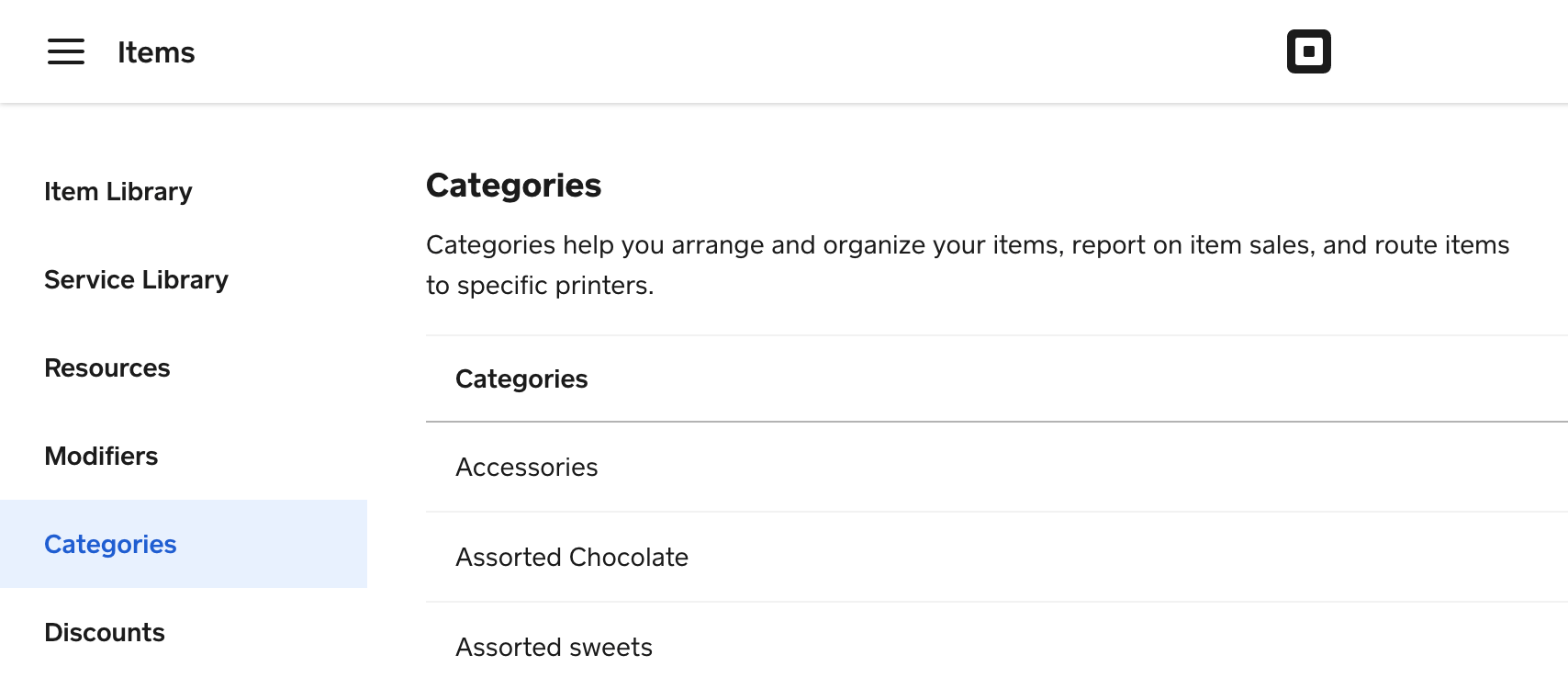
Select Categories to start creating categories for your Square Point of Sale screen!
Community Moderator, Square
Sign in and click Mark as Best Answer if my reply answers your question.
- Subscribe to RSS Feed
- Mark Thread as New
- Mark Thread as Read
- Float this Thread for Current User
- Bookmark
- Subscribe
- Printer Friendly Page
I'm sorry. I misunderstood Justin 's post. While he did say, "Categories made in Square Online do not sync with Square POS," He went on to say, "You'll need to add them to Dashboard or your Terminal so they can reflect on your POS." I incorrectly interpreted that to mean there was a work around and if I added the categories to my dashboard, they would appear on my Square Terminal. Does Square intend on making all their platforms and hardware seamlessly synced eventually?
- Subscribe to RSS Feed
- Mark Thread as New
- Mark Thread as Read
- Float this Thread for Current User
- Bookmark
- Subscribe
- Printer Friendly Page
If you created your categories on the Square Point of Sale side, via your Item Library within your Square Dashboard, then those categories can be imported one time from Square POS to Square Online to simplify initial setup, @linalecia.
Unfortunately, it's not currently possible to do the reverse, but our team is constantly working to integrate our products and support a more seamless experience. I've moved a few of these posts over to a thread where others have asked about this, so that when we have news to share about this request, you'll be the first to know!
Community Moderator, Square
Sign in and click Mark as Best Answer if my reply answers your question.

- Subscribe to RSS Feed
- Mark Thread as New
- Mark Thread as Read
- Float this Thread for Current User
- Bookmark
- Subscribe
- Printer Friendly Page
Is there a way to sync my point of sale categories with the web store? After spending hours on my inventory and categorizing thousands of unique items. The web store has a separate category system. Now it seems like every item will need to be placed into the same category I already did in the point of sale. Unless there is a way to sync everything? like it should.
- Subscribe to RSS Feed
- Mark Thread as New
- Mark Thread as Read
- Float this Thread for Current User
- Bookmark
- Subscribe
- Printer Friendly Page
Although items can be imported into the Online Store (powered by Weebly), categories cannot.
I totally understand the amount of time and dedication you've spent categorizing your inventory. We're constantly making improvements to the Online Store that makes inventory syncing much more convenient and seamless. Passing this one up as a feature request for now.
Thanks for posting.
Community Moderator, Square
Sign in and click Mark as Best Answer if my reply answers your question.

- Subscribe to RSS Feed
- Mark Thread as New
- Mark Thread as Read
- Float this Thread for Current User
- Bookmark
- Subscribe
- Printer Friendly Page
We could really use this sync feature as well. We have over 6,500 items in our store, and several hundred categories.
Also, is there a way to have the online store NOT display items that are out of stock??
- Subscribe to RSS Feed
- Mark Thread as New
- Mark Thread as Read
- Float this Thread for Current User
- Bookmark
- Subscribe
- Printer Friendly Page
Yes, at least an option to sort the items by qty on hand. At least then everything that has a 0 qty could be easily hidden.

- Subscribe to RSS Feed
- Mark Thread as New
- Mark Thread as Read
- Float this Thread for Current User
- Bookmark
- Subscribe
- Printer Friendly Page
I second this request. I did the opposite; I've spent hours on my webpage then found the setting to sync- when I selected it, it removed many items' categories.

Square Community
Square Products