
- Home
- >
- Community Hub
- >
- Community Corner
- >
- error Receipt image should have content type image...

- Subscribe to RSS Feed
- Mark Thread as New
- Mark Thread as Read
- Float this Thread for Current User
- Bookmark
- Subscribe
- Printer Friendly Page
error Receipt image should have content type image/jpeg, image/pjpeg, image/png, image/x-png .
I keep getting this error message. I don't know what to do. I uploaded my logo but keep getting error when I try to upload background profile image for my receipt. Help, please
- Mark as New
- Bookmark
- Subscribe
- Subscribe to RSS Feed
- Permalink
- Report



- Subscribe to RSS Feed
- Mark Thread as New
- Mark Thread as Read
- Float this Thread for Current User
- Bookmark
- Subscribe
- Printer Friendly Page
Oh no, @Loftedpigeon! 🐦
Firstly, welcome to the Seller Community + sorry to see that you're here because you've run into trouble.
What image type are you trying to upload? Are you uploading it here or somewhere else?
Community Moderator, Square
Sign in and click Mark as Best Answer if my reply answers your question.
- Mark as New
- Bookmark
- Subscribe
- Subscribe to RSS Feed
- Permalink
- Report
- Subscribe to RSS Feed
- Mark Thread as New
- Mark Thread as Read
- Float this Thread for Current User
- Bookmark
- Subscribe
- Printer Friendly Page
I was trying to upload an image to use as a receipt background, but nothing was working so I just ended up using a plain coloured rectangle. Not sure what was meant by image. I was using my laptop on the site
- Mark as New
- Bookmark
- Subscribe
- Subscribe to RSS Feed
- Permalink
- Report
- Subscribe to RSS Feed
- Mark Thread as New
- Mark Thread as Read
- Float this Thread for Current User
- Bookmark
- Subscribe
- Printer Friendly Page
Sorry - it looks like that's the link to our contact page instead of a help article or Seller Community post 🙁
You should be able to upload an image via your Square Dashboard > Account & Settings > Business > Locations

You can also use your Square Point of Sale app > Settings > Account > Business information
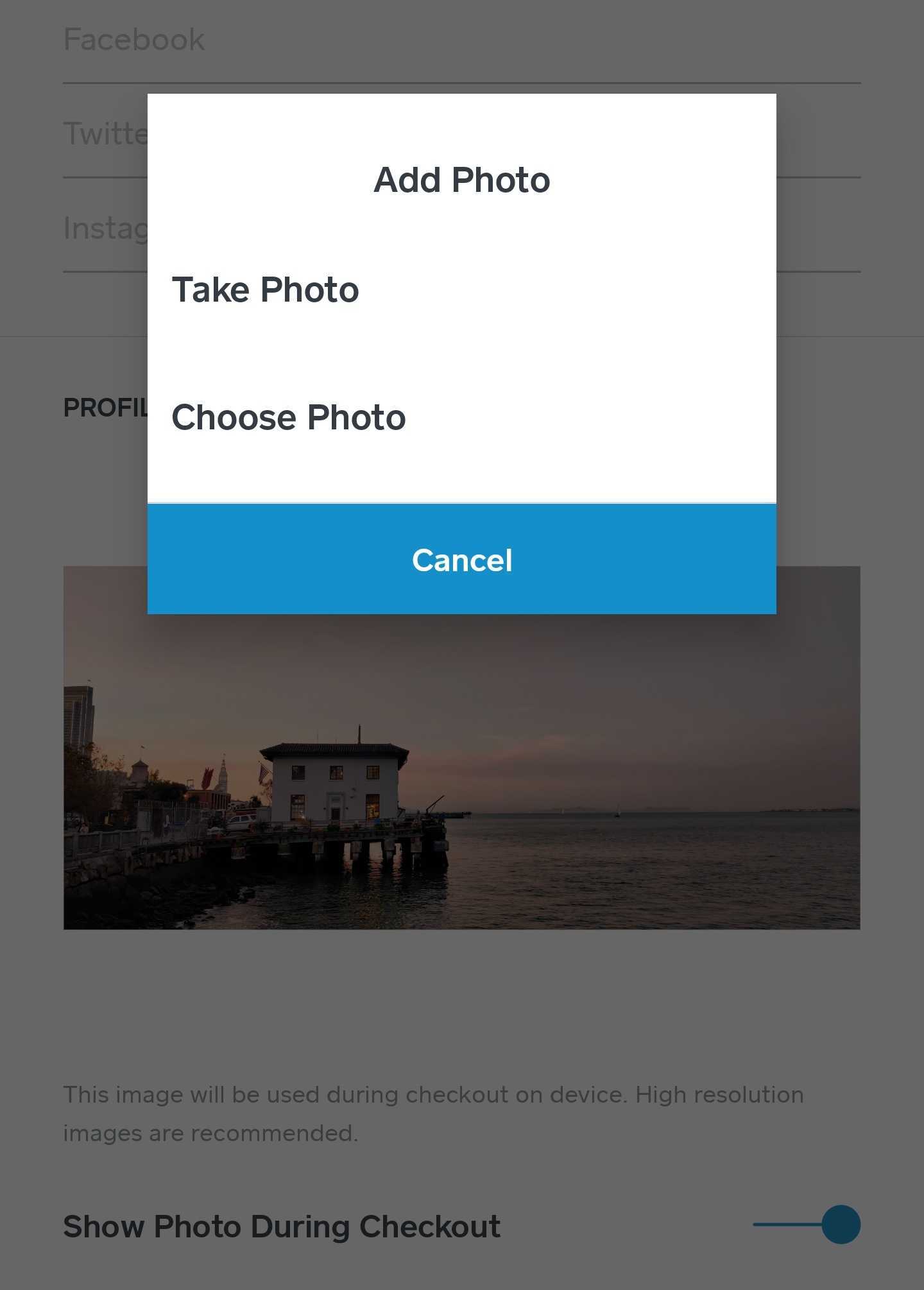
I don't believe you ever answered my question, "What image type are you trying to upload?"
I know you initially tried uploading via your Square Dashboard (first screenshot) - have you tried your app yet (second screenshot)? Thanks in advance, @Loftedpigeon!
Community Moderator, Square
Sign in and click Mark as Best Answer if my reply answers your question.
- Mark as New
- Bookmark
- Subscribe
- Subscribe to RSS Feed
- Permalink
- Report
- Subscribe to RSS Feed
- Mark Thread as New
- Mark Thread as Read
- Float this Thread for Current User
- Bookmark
- Subscribe
- Printer Friendly Page
Yes. I figured out the logo upload but I read in the help article under update logo,
Once uploaded, you’ll need to enable the checkout background in the Square app:
- Tap Settings in the navigation menu > Account > Business Information.
- Under Profile Image, toggle Show Photo in Checkout on.
This is where I am confused. Do I do this from the dashboard or in the App on my phone? Either way, I can't find it
- Mark as New
- Bookmark
- Subscribe
- Subscribe to RSS Feed
- Permalink
- Report
- Subscribe to RSS Feed
- Mark Thread as New
- Mark Thread as Read
- Float this Thread for Current User
- Bookmark
- Subscribe
- Printer Friendly Page
Can you please share with me the link to the instructions you're following @Loftedpigeon?
Community Moderator, Square
Sign in and click Mark as Best Answer if my reply answers your question.
- Mark as New
- Bookmark
- Subscribe
- Subscribe to RSS Feed
- Permalink
- Report
- Subscribe to RSS Feed
- Mark Thread as New
- Mark Thread as Read
- Float this Thread for Current User
- Bookmark
- Subscribe
- Printer Friendly Page
I saved my logo I think, but it won't let me get past this error message when I try to save. I'm in Location Details under Point of Sale Checkout Background. Here is the link for the instructions.
https://squareup.com/help/ca/en/contact?panel=F5478ED2FCB8
- Mark as New
- Bookmark
- Subscribe
- Subscribe to RSS Feed
- Permalink
- Report

Square Community