

- Subscribe to RSS Feed
- Mark Thread as New
- Mark Thread as Read
- Float this Thread for Current User
- Bookmark
- Subscribe
- Printer Friendly Page
Square POS can't fine my usb Printer-Driven Cash Drawers
Hi everyone,
I have Printer-Driven Cash Drawers(Star Micronics TSP143USB with Lightning Data and Charge) got the USB C to USB A cable to connect my iPad pro and printer
but the Square POS app is not able to find the printer.
I did download TSP100lll Utility and StarQuickSetup app from the Apple app store
to try, end up they did work. not sure which part went wrong.
if anyone knows how to fix it big thanks in advance (:
- Mark as New
- Bookmark
- Subscribe
- Subscribe to RSS Feed
- Permalink
- Report



- Subscribe to RSS Feed
- Mark Thread as New
- Mark Thread as Read
- Float this Thread for Current User
- Bookmark
- Subscribe
- Printer Friendly Page
Hi @po1013,
Thanks for writing in and sorry to hear about the trouble connecting your printer to your Point of Sale.
It looks like the Star Micronics TSP143 printer in the Network or WiFi configuration can be connected to your Point of Sale via your iPad directly. The USB model would be able to pair to an iPad in a Square Stand according to our compatibility page. Would you happen to know the exact model number eg. do you have the TSP143IIU or the TSP143GT model? Some printers have the option to toggle between the USB and Wifi / Ethernet interface.
Looking forward to hearing back from you!
- Mark as New
- Bookmark
- Subscribe
- Subscribe to RSS Feed
- Permalink
- Report
- Subscribe to RSS Feed
- Mark Thread as New
- Mark Thread as Read
- Float this Thread for Current User
- Bookmark
- Subscribe
- Printer Friendly Page
- Mark as New
- Bookmark
- Subscribe
- Subscribe to RSS Feed
- Permalink
- Report
- Subscribe to RSS Feed
- Mark Thread as New
- Mark Thread as Read
- Float this Thread for Current User
- Bookmark
- Subscribe
- Printer Friendly Page
Unfortunately, the Star Micronics TSP143lllU can only be connected to our Point of Sale via USB through a Square Stand at the moment. Did you purchase this printer via our website? You might be able to exchange it for a wifi or ethernet-compatible one to connect to your iPad.
- Mark as New
- Bookmark
- Subscribe
- Subscribe to RSS Feed
- Permalink
- Report
- Subscribe to RSS Feed
- Mark Thread as New
- Mark Thread as Read
- Float this Thread for Current User
- Bookmark
- Subscribe
- Printer Friendly Page
Hi @Arie , just rang up Square customer service
he recommends getting Hub for Square Terminal
to solve this issue. I hope it works 🤞
This printer-driven cash drawer from the previous business owner
it was working fine with their iPad(lightning port) and ABCUS POS.
- Mark as New
- Bookmark
- Subscribe
- Subscribe to RSS Feed
- Permalink
- Report
- Subscribe to RSS Feed
- Mark Thread as New
- Mark Thread as Read
- Float this Thread for Current User
- Bookmark
- Subscribe
- Printer Friendly Page
Please let us know how you go with the hub, @po1013.
- Mark as New
- Bookmark
- Subscribe
- Subscribe to RSS Feed
- Permalink
- Report
- Subscribe to RSS Feed
- Mark Thread as New
- Mark Thread as Read
- Float this Thread for Current User
- Bookmark
- Subscribe
- Printer Friendly Page
Yes sure @Arie, just in case the Hub for Square Terminal won't work
I consider getting Star Micronics mPOP Receipt Printer and Cash Drawer
just wondering if taking orders on my iPad pro(Square POS) via wifi to connect
Square Terminal to take card payments, via Bluetooth to open cash drawer to cash payments.
Not sure do I still need Hub Square for Square Terminal to connect mPOP?
Thank you (:
- Mark as New
- Bookmark
- Subscribe
- Subscribe to RSS Feed
- Permalink
- Report



- Subscribe to RSS Feed
- Mark Thread as New
- Mark Thread as Read
- Float this Thread for Current User
- Bookmark
- Subscribe
- Printer Friendly Page
Hey @po1013,
If you've not already looked, you can find a full printer compatibility guide for Square hardware here!
Both the mPop and your existing printer are able to connect to Terminal via USB (on Hub for Terminal). Terminal doesn't feature Bluetooth compatibility at the moment so you won't be able to pop the cash drawer via Bluetooth.
Square, Australia
Sign in and click Mark as Best Answer if my reply answers your question.
- Mark as New
- Bookmark
- Subscribe
- Subscribe to RSS Feed
- Permalink
- Report
- Subscribe to RSS Feed
- Mark Thread as New
- Mark Thread as Read
- Float this Thread for Current User
- Bookmark
- Subscribe
- Printer Friendly Page
Hi @Arie,
Just received the Hub today and following the instruction
to connect everything together, unfortunately
the Square Pos(on my iPad)still not finding the printer-driven cash drawer.
- Mark as New
- Bookmark
- Subscribe
- Subscribe to RSS Feed
- Permalink
- Report

- Subscribe to RSS Feed
- Mark Thread as New
- Mark Thread as Read
- Float this Thread for Current User
- Bookmark
- Subscribe
- Printer Friendly Page
Hi @po1013, just jumping in here on behalf of @Arie while they're out of the office!
I'm not sure I've understood you correctly here, are you attempting to connect your printer to the Square Terminal via the Hub for Terminal, or directly via your Square Stand via the USB Accessory hub?
If you're experiencing Square Stand USB connection issues, I recommend giving the following troubleshooting steps a try:
1. On your Square Stand, navigate to your Settings > Hardware > Square Stand. If the Square Stand is showing as connected but there is no USB Hub found, select the Restart Stand button in the upper-right window in Settings.
2. Force quite the Square POS app, then re-open app.
3. Ensure iOS and Square POS app are up to date.
4. Unplug the Square Stand from the power source, remove iPad from the Square Stand and restart the iPad.
5. Then, plug back into the power source and insert the iPad back into the Square Stand.
If you continue to experience issues after trying the above, we recommend continuing this conversation with our Support Team, as they'll be able to assist you in real-time to further troubleshoot these issues.
Community Moderator, Australia, Square
Sign in and click Mark as Best Answer if my reply answers your question.
- Mark as New
- Bookmark
- Subscribe
- Subscribe to RSS Feed
- Permalink
- Report
- Subscribe to RSS Feed
- Mark Thread as New
- Mark Thread as Read
- Float this Thread for Current User
- Bookmark
- Subscribe
- Printer Friendly Page
Hi @Laurie_
I don't use Square stand with my iPad pro 11"(USB C port)
it works together with the terminal to take card payment
but it does not work with printer-driven cash drawer.
(Square POS can't find this printer to open the cash drawer)
been advised to order the hub to solve this issue but still not working.
Thank you
- Mark as New
- Bookmark
- Subscribe
- Subscribe to RSS Feed
- Permalink
- Report
- Subscribe to RSS Feed
- Mark Thread as New
- Mark Thread as Read
- Float this Thread for Current User
- Bookmark
- Subscribe
- Printer Friendly Page
Hi @po1013,
If you've ordered a USB printer and a USB hub for Terminal, then you'll be able to use Terminal with the printer. The printer connected to the Terminal can open the printer driven cash drawer for transactions completed on Square Terminal, however this setup won't transplant to an iPad. The iPad would need to be connected to its own printer, either via Wifi or USB (via a Stand). Is the printer working as intended when you process the transaction on Terminal?
Sorry if there's been any confusion here - per @Arie's original advice, the printer model you've quoted is not compatible with iPads, but it is compatible with Square Terminal via the Terminal hub. Plugging the printer into the Terminal is to get it working on the Terminal, not your iPad. Again we recommend consulting our hardware compatibility guide as the source of truth to determine which printer will work with what Square hardware/mobile device.
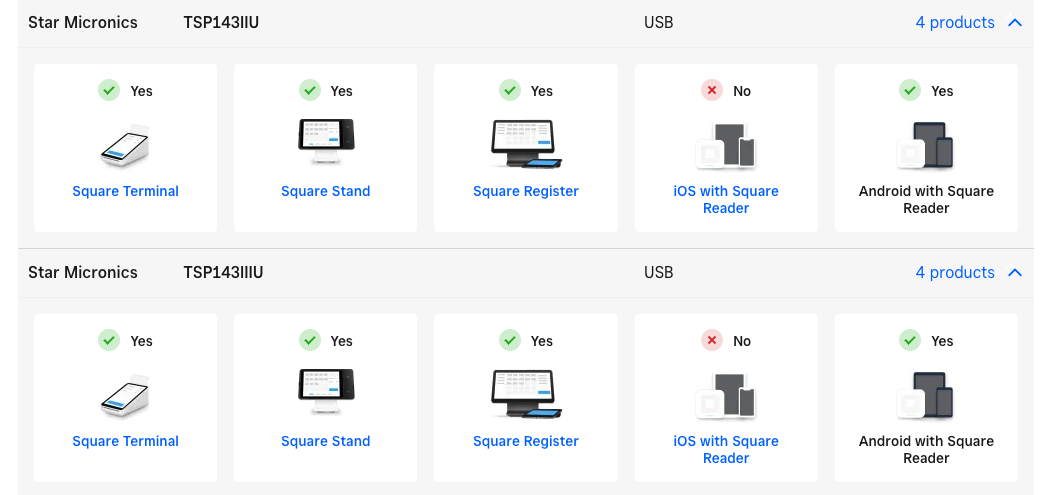
It sounds as though support might have been confused as to what you were trying to do, and recommended hub for Terminal in order to get things going with your printer via your Terminal, as an alternative to the iPad. If you want a printer that will work simultaneously with both your Terminal and iPad, you will need a network-based printer. There are a few listed on the compatibility page, such as these models:
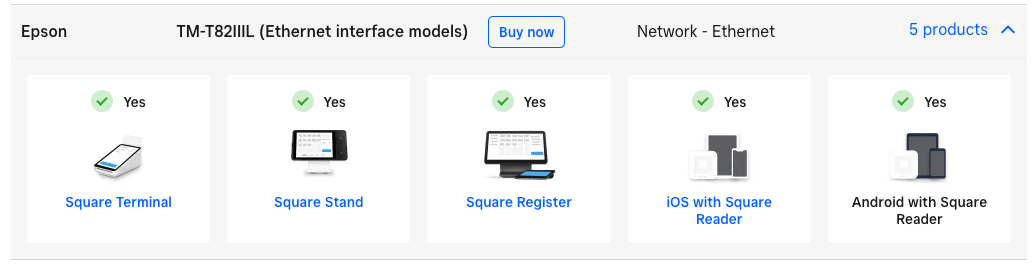
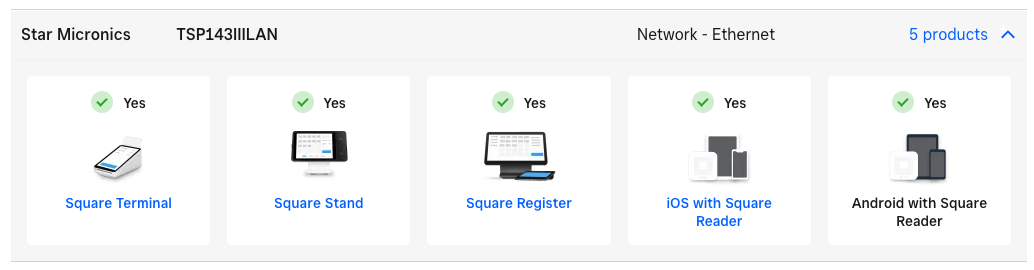
If you'd like to return the printer, we recommend filing a return via our website under the 30 day money back guarantee. Apologies again for the confusion here!
Square, Australia
Sign in and click Mark as Best Answer if my reply answers your question.
- Mark as New
- Bookmark
- Subscribe
- Subscribe to RSS Feed
- Permalink
- Report

Square Community
Square Products