

- Subscribe to RSS Feed
- Mark Thread as New
- Mark Thread as Read
- Float this Thread for Current User
- Bookmark
- Subscribe
- Printer Friendly Page
Customising a receipt for health fund
Needing help with how to have information for clients health fund show up on receipts, square says go to accounts and settings in the dashboard then business and receipts but that option isn't even there. Please help someone! Clare
- Mark as New
- Bookmark
- Subscribe
- Subscribe to RSS Feed
- Permalink
- Report



- Subscribe to RSS Feed
- Mark Thread as New
- Mark Thread as Read
- Float this Thread for Current User
- Bookmark
- Subscribe
- Printer Friendly Page
Hi @Clarerainbow 👋
I noticed it's your first post, so welcome to our Community!
I'd be happy to help here. Making edits is easiest via your Dashboard on a computer, and you can add details to your receipt via Account & Settings > Business Information > Receipts - use this direct link if you're still stuck.
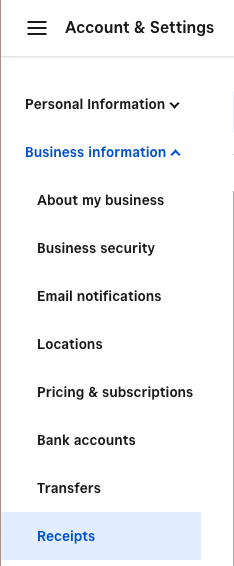
Please let us know how you go 🙂
- Mark as New
- Bookmark
- Subscribe
- Subscribe to RSS Feed
- Permalink
- Report
- Subscribe to RSS Feed
- Mark Thread as New
- Mark Thread as Read
- Float this Thread for Current User
- Bookmark
- Subscribe
- Printer Friendly Page
Thankyou Arie! Really appreciate your help. I will try it out soon when I get to my computer, guessing that's why i didn't see that option then as I use the square ap on my phone.
Will let you know how I go!
Clare
- Mark as New
- Bookmark
- Subscribe
- Subscribe to RSS Feed
- Permalink
- Report
- Subscribe to RSS Feed
- Mark Thread as New
- Mark Thread as Read
- Float this Thread for Current User
- Bookmark
- Subscribe
- Printer Friendly Page
Hi again Arie!
So i went ahead and did it successfully, however, it looks like this modifies the receipt for all customers, is there a way to modify it for individual customers? I am needing to do this for clients with health funds, therefore the details will be different each time.
Thank you, hope your having a magical day!
Clare 🙂
- Mark as New
- Bookmark
- Subscribe
- Subscribe to RSS Feed
- Permalink
- Report
- Subscribe to RSS Feed
- Mark Thread as New
- Mark Thread as Read
- Float this Thread for Current User
- Bookmark
- Subscribe
- Printer Friendly Page
I see what you mean, @Clarerainbow - right now, this would in fact impact all your receipts, including those for customers who don't have health funds. Another option would be to utilize the Notes section in the checkout when going through a sale. This would just be a bit more cumbersome as you would have to enter the information for each individual sale, rather than it being automatically included. However, if the details differ for each health fund anyways, using notes would probably be the best way forward 🙂
- Mark as New
- Bookmark
- Subscribe
- Subscribe to RSS Feed
- Permalink
- Report
- Subscribe to RSS Feed
- Mark Thread as New
- Mark Thread as Read
- Float this Thread for Current User
- Bookmark
- Subscribe
- Printer Friendly Page
Thankyou Arie, got it figured out! Using both ways I was able to get all information needed on the receipt.
Clare 😊
- Mark as New
- Bookmark
- Subscribe
- Subscribe to RSS Feed
- Permalink
- Report

Square Community
Square Products