

- Subscribe to RSS Feed
- Mark Thread as New
- Mark Thread as Read
- Float this Thread for Current User
- Bookmark
- Subscribe
- Printer Friendly Page
Auto discount . Remove manual option
I have created an automatic happy hour discount that applies during a time frame. Square allows you to apply the discount outside the prescribed times. I don’t want the discount to be manually applyable outside the happy hour.
- Mark as New
- Bookmark
- Subscribe
- Subscribe to RSS Feed
- Permalink
- Report



- Subscribe to RSS Feed
- Mark Thread as New
- Mark Thread as Read
- Float this Thread for Current User
- Bookmark
- Subscribe
- Printer Friendly Page
Hi there, @DIBBSY,
Thanks for writing in with your feedback about automatic discounts.
Discounts you create can be manually added to all sales, including automatic discounts. To prevent the manual addition of automatic discounts at the point of sale, you can require a passcode. The passcode is only prompted when a user attempts to manually add a discount outside of the automatic discount rules. Eligible purchases will still receive the automatic discount.
To add a passcode to your discount, follow the below steps:
1. From your online Square Dashboard, navigate to Items > Discounts.
2. Select your discount. Scroll down to the bottom of the page and next to Advanced Settings, select Show Settings.
3. Toggle on the option to Require Passcode and select Save.
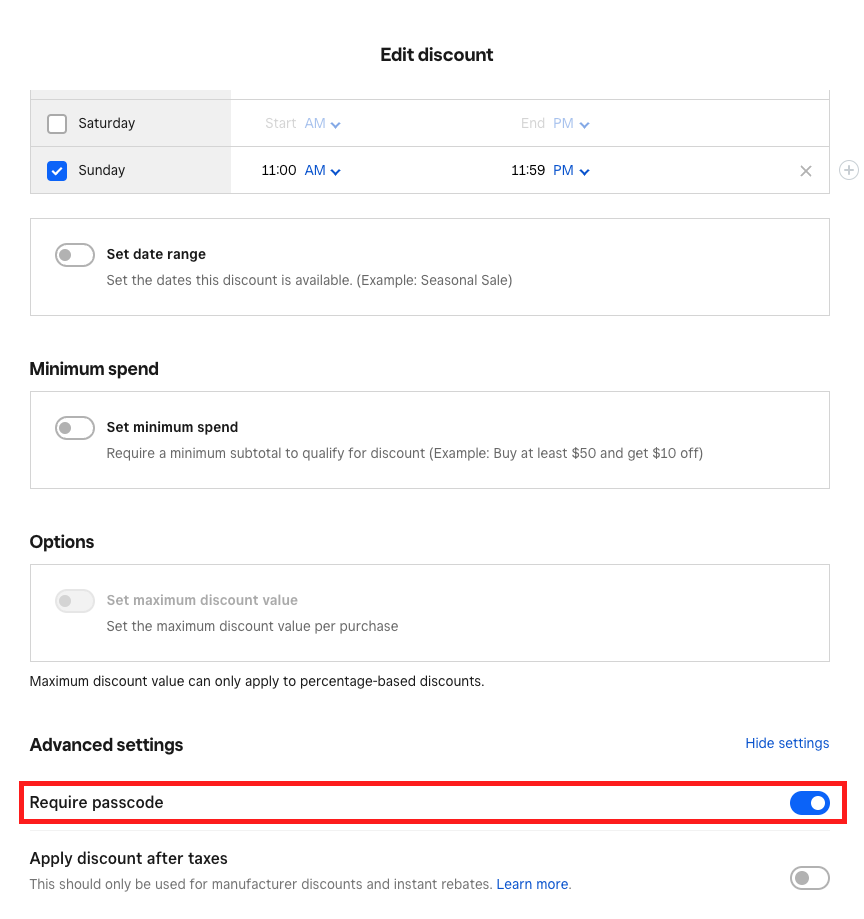
Note: you can view your owner passcode in your online Square Dashboard by navigating to Account & Settings > Sign In & Security.
Let me know if you have any other questions about using automatic discounts!
Community Moderator, Australia, Square
Sign in and click Mark as Best Answer if my reply answers your question.
- Mark as New
- Bookmark
- Subscribe
- Subscribe to RSS Feed
- Permalink
- Report

Square Community
Square Products