
- Home
- >
- Feedback
- >
- Feature Requests
- >
- Include Item Name and Variation Name as Reference ...
Hi sellers, we're glad you're here! Let us help you get the most out of this space.
Read about the Feature Request process and FAQs here.

Include Item Name and Variation Name as Reference on Variation Detail Screens
The Item Name and Variation Name should be included at the top of the Variation detail screens as a reference and confirmation that the variation details are for the intended item and variation. The majority of our items have variations based on standard option sets. The variation name is a combination of the concatenated option set values. Multiple items can have the exact or very similar variation names. Including the item name and variation name as a reference at the top of the variation detail screens will provide confirmation that the details are for the intended item/variation combination.
Variation screens: Add Variation, Edit Variation Details, Manage Stock, Edit Stock Tracking, Stock History, Manage Stock, etc.
Examples:
- Edit Variation Details screen, should include the Item Name. The Variation Name is displayed and protected. The Item Name should be listed above the variation name, also protected.

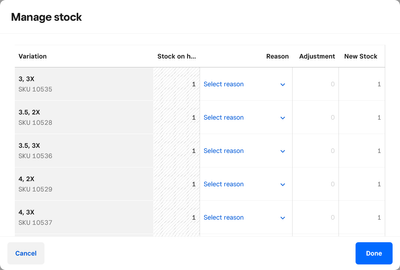
- Edit Variation Manage Stock screen, should include both the Item Name and Variation Name (protected) to provide confirmation that the stock adjustments are being made for the correct Item/Variation combination.

- Stock History screen should include the Item Name. Including the item on detailed screen also allows screen shots to be taken and socialized with others without the need of writing down the item name.
- Manage Stock screen should include the Item Name. Another important screen to show the item name as validation that the stock adjustments are being made to the correct item.
Owner
TwinkleToes Dance Store
- Subscribe to RSS Feed
- Mark as New
- Mark as Read
- Bookmark
- Subscribe
- Printer Friendly Page
- Report
Square Community