
- Home
- >
- Community Hub
- >
- Community Corner
- >
- Re: How do i turn off the ‘low stock’ option when ...

- Subscribe to RSS Feed
- Mark Thread as New
- Mark Thread as Read
- Float this Thread for Current User
- Bookmark
- Subscribe
- Printer Friendly Page
How do i turn off the ‘low stock’ option when I add items?
How do I turn off ‘low stock’ when I add items. It shows ‘low stock’ on items that have less than 5 in stock but I want to add a bunch of one of a kind pieces so showing low stock seems unnecessary bc there will only ever be 1 in stock.

- Subscribe to RSS Feed
- Mark Thread as New
- Mark Thread as Read
- Float this Thread for Current User
- Bookmark
- Subscribe
- Printer Friendly Page
Hi guys,
Thankyou for all the comments they were really helpful. Took me a while but for anyone who doesn't have Settings > General or Shared Settings as an, I found the solution by going to Online > (click drop down menu) Items > Item Preferences > edit Item Statuses > Toggle Low Stock Indicator option.



- Subscribe to RSS Feed
- Mark Thread as New
- Mark Thread as Read
- Float this Thread for Current User
- Bookmark
- Subscribe
- Printer Friendly Page
Hey @Bloopbloop-
You can disable low stock alerts by selecting the item in your Item Library > select the highlighted number of stock > disable low stock alerts > Save:
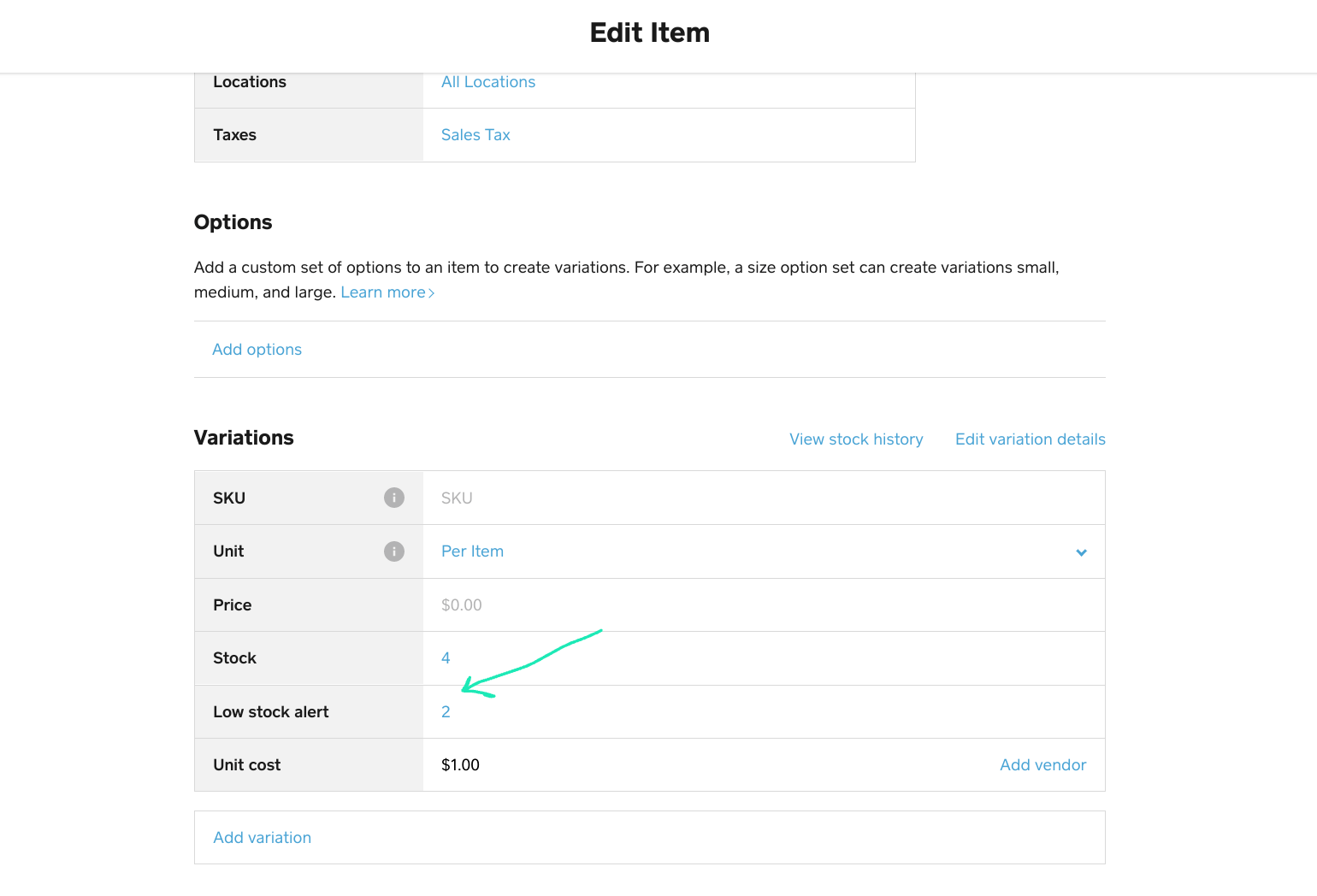

Does that help? Let me know! 💡

- Subscribe to RSS Feed
- Mark Thread as New
- Mark Thread as Read
- Float this Thread for Current User
- Bookmark
- Subscribe
- Printer Friendly Page
The 'low stock alerts' option is already turned off but it still shows 'low stock' on the front end of the website shop. The low stock alert seems to maybe just alert me in the backend but i want to remove it from showing in the store.

- Subscribe to RSS Feed
- Mark Thread as New
- Mark Thread as Read
- Float this Thread for Current User
- Bookmark
- Subscribe
- Printer Friendly Page
Okay, the 'low stock' will disappear if i turn off 'tracking' of the item, except i DO want to track the item b/c i don't want to sell more than i have in stock. Does anyone know if turning off tracking still is tracking if my stock goes to 0?

- Subscribe to RSS Feed
- Mark Thread as New
- Mark Thread as Read
- Float this Thread for Current User
- Bookmark
- Subscribe
- Printer Friendly Page
Did you ever figure this out? The “low stock” is sooo visually stunning unpleasant
- Subscribe to RSS Feed
- Mark Thread as New
- Mark Thread as Read
- Float this Thread for Current User
- Bookmark
- Subscribe
- Printer Friendly Page
No, but I still really want to know how to remove it

- Subscribe to RSS Feed
- Mark Thread as New
- Mark Thread as Read
- Float this Thread for Current User
- Bookmark
- Subscribe
- Printer Friendly Page
Wssp!
Online Store Dashboard > Settings > General > scroll to the bottom, toggle off Low Inventory Indicator
Community Moderator, Square
Sign in and click Mark as Best Answer if my reply answers your question.
- Subscribe to RSS Feed
- Mark Thread as New
- Mark Thread as Read
- Float this Thread for Current User
- Bookmark
- Subscribe
- Printer Friendly Page
Thanks!!!
- Subscribe to RSS Feed
- Mark Thread as New
- Mark Thread as Read
- Float this Thread for Current User
- Bookmark
- Subscribe
- Printer Friendly Page
yessss...success! Thank you!!

- Subscribe to RSS Feed
- Mark Thread as New
- Mark Thread as Read
- Float this Thread for Current User
- Bookmark
- Subscribe
- Printer Friendly Page
So uh....this option doesn't appear for me in Online Store Dashboard > Settings > General, did something change or update? I'm trying desperately to accomplish this.



- Subscribe to RSS Feed
- Mark Thread as New
- Mark Thread as Read
- Float this Thread for Current User
- Bookmark
- Subscribe
- Printer Friendly Page
Hey @kev_aROS,
I'm wondering if things may have changed here - I was able to find these settings via the Online Dashboard under "Shared Settings > Item Preferences"

Let me know if this helps!
Square, Australia
Sign in and click Mark as Best Answer if my reply answers your question.
- Subscribe to RSS Feed
- Mark Thread as New
- Mark Thread as Read
- Float this Thread for Current User
- Bookmark
- Subscribe
- Printer Friendly Page
That's where I found it too. Thanks.
- Subscribe to RSS Feed
- Mark Thread as New
- Mark Thread as Read
- Float this Thread for Current User
- Bookmark
- Subscribe
- Printer Friendly Page
I found this page finally but it wont permit me to turn off the low inventory indicator
- Subscribe to RSS Feed
- Mark Thread as New
- Mark Thread as Read
- Float this Thread for Current User
- Bookmark
- Subscribe
- Printer Friendly Page
Looks like the location of this was updated slightly since the last comment. I found these settings in the Online Dashboard under Items > Item Preferences
- Subscribe to RSS Feed
- Mark Thread as New
- Mark Thread as Read
- Float this Thread for Current User
- Bookmark
- Subscribe
- Printer Friendly Page
Hi guys,
Thankyou for all the comments they were really helpful. Took me a while but for anyone who doesn't have Settings > General or Shared Settings as an, I found the solution by going to Online > (click drop down menu) Items > Item Preferences > edit Item Statuses > Toggle Low Stock Indicator option.

Square Community