

- Subscribe to RSS Feed
- Mark Thread as New
- Mark Thread as Read
- Float this Thread for Current User
- Bookmark
- Subscribe
- Printer Friendly Page
We have many employees and multiple locations and have found Square Teams very user friendly - EXCEPT on the back end.
We schedule everyone at their location of the day (Or the shift, as some of the staff float around during shifts) but when they clock in on their, app the system doesn't clock them into the location where they are scheduled. I need to be able to see who worked where and run accurate labor vs. sales report for each location without manually changing every employee for every shift. Help..
- Mark as New
- Bookmark
- Subscribe
- Subscribe to RSS Feed
- Permalink
- Report



- Subscribe to RSS Feed
- Mark Thread as New
- Mark Thread as Read
- Float this Thread for Current User
- Bookmark
- Subscribe
- Printer Friendly Page
Hi @TxSmokeBBQ - Thanks for reaching out to us here on the Square Seller Community👋
There is a Settings icon in the righthand corner of the Home page that allows Team Members to change the location before clocking in (shown below).
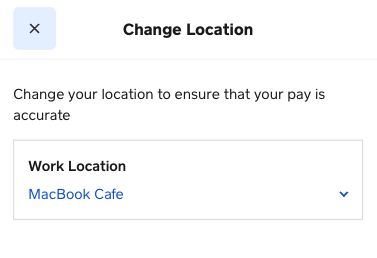
A member of the Team app Product Team also let me know that in the coming months, we plan to release a new clock-in flow which will make this option more explicit.
I hope this information is helpful but please do let me know if you have any additional questions 🙂
Community Moderator, Square
Sign in and click Mark as Best Answer if my reply answers your question.
- Mark as New
- Bookmark
- Subscribe
- Subscribe to RSS Feed
- Permalink
- Report
- Subscribe to RSS Feed
- Mark Thread as New
- Mark Thread as Read
- Float this Thread for Current User
- Bookmark
- Subscribe
- Printer Friendly Page
Hi @TxSmokeBBQ - Thanks for reaching out to us here on the Square Seller Community👋
There is a Settings icon in the righthand corner of the Home page that allows Team Members to change the location before clocking in (shown below).
A member of the Team app Product Team also let me know that in the coming months, we plan to release a new clock-in flow which will make this option more explicit.
I hope this information is helpful but please do let me know if you have any additional questions 🙂
Community Moderator, Square
Sign in and click Mark as Best Answer if my reply answers your question.
- Mark as New
- Bookmark
- Subscribe
- Subscribe to RSS Feed
- Permalink
- Report
- Subscribe to RSS Feed
- Mark Thread as New
- Mark Thread as Read
- Float this Thread for Current User
- Bookmark
- Subscribe
- Printer Friendly Page
Brutal. So each time they clock out of one location and move to a different location, they have to change the settings in their app? That's terribly cumbersome for such an intuitive and otherwise user-friendly system. I have a hard enough time getting them to remember to clock in and out for breaks let alone going into app settings and adjusting locations when the schedule clearly identifies where they're supposed to be (and so should be able to assign those hours to the scheduled location).
- Mark as New
- Bookmark
- Subscribe
- Subscribe to RSS Feed
- Permalink
- Report
- Subscribe to RSS Feed
- Mark Thread as New
- Mark Thread as Read
- Float this Thread for Current User
- Bookmark
- Subscribe
- Printer Friendly Page
Thanks for your feedback here, @BBBQ - Sorry to hear your discontent.
As mentioned in my post above, our Product Team plans to address this so that the "select location" option is more visible to your Team Members. In the meantime, keep an eye out for any updates in our Seller Community.
We appreciate your input and thank you for your patience until then 🙂
Community Moderator, Square
Sign in and click Mark as Best Answer if my reply answers your question.
- Mark as New
- Bookmark
- Subscribe
- Subscribe to RSS Feed
- Permalink
- Report

Square Community
Square Products