

- Subscribe to RSS Feed
- Mark Thread as New
- Mark Thread as Read
- Float this Thread for Current User
- Bookmark
- Subscribe
- Printer Friendly Page
The Map is Wrong in Location and Hours
We have moved. I have updated the address information in the Square Dashboard. The address is showing up correctly in the Square store site, but the map is still displaying the old address. I have removed the map, published the site, added the map back but the map is still showing the old location. The Get Directions link does show the new location.
How can I force the map in the location and hours section to update to the new address?
Thanks.
- Mark as New
- Bookmark
- Subscribe
- Subscribe to RSS Feed
- Permalink
- Report
- Subscribe to RSS Feed
- Mark Thread as New
- Mark Thread as Read
- Float this Thread for Current User
- Bookmark
- Subscribe
- Printer Friendly Page
I don't know what I did, but the map has decided to update to the correct location.
- Mark as New
- Bookmark
- Subscribe
- Subscribe to RSS Feed
- Permalink
- Report



- Subscribe to RSS Feed
- Mark Thread as New
- Mark Thread as Read
- Float this Thread for Current User
- Bookmark
- Subscribe
- Printer Friendly Page
It can take a moment for certain changes to reflect properly on your website, @Susan-Council. It sounds like this is what happened -sorry for the confusion here! Let us know if this issue pops back up and doesn't correct itself 😊
Community Moderator, Square
Sign in and click Mark as Best Answer if my reply answers your question.
- Mark as New
- Bookmark
- Subscribe
- Subscribe to RSS Feed
- Permalink
- Report

- Subscribe to RSS Feed
- Mark Thread as New
- Mark Thread as Read
- Float this Thread for Current User
- Bookmark
- Subscribe
- Printer Friendly Page
Valentina, can you help me with my page. I haven't finished everything on the site and want to publish it with the correct map location and address. I updated my locations weeks ago, but the preview of my page is still showing the old, incorrect address.
- Mark as New
- Bookmark
- Subscribe
- Subscribe to RSS Feed
- Permalink
- Report
- Subscribe to RSS Feed
- Mark Thread as New
- Mark Thread as Read
- Float this Thread for Current User
- Bookmark
- Subscribe
- Printer Friendly Page
Hi there @sodanerdy! ✨
I'm not sure if you were able to make the changes you wanted since posting here, but it looks like you've got a section for each of your locations on your website. One thing to note is that the address shown by default in your Location and hours section will be the one that appears in the Square Sync section of your Square Online Dashboard (Settings > Square Sync).
If the address shown in these Location and hours section is not accurate, you can edit by clicking the section name. You'll have the option of selecting between existing locations, or entering the information by choosing I'll enter this information myself.
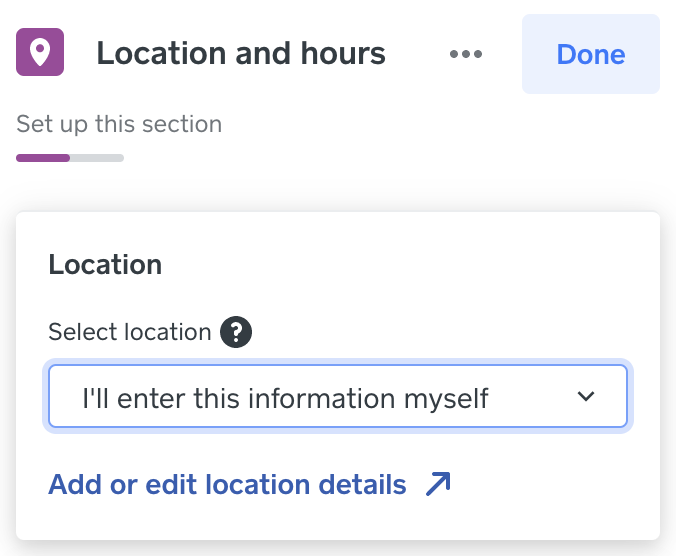
When you select I'll enter this information myself, a new section will appear beneath this box:
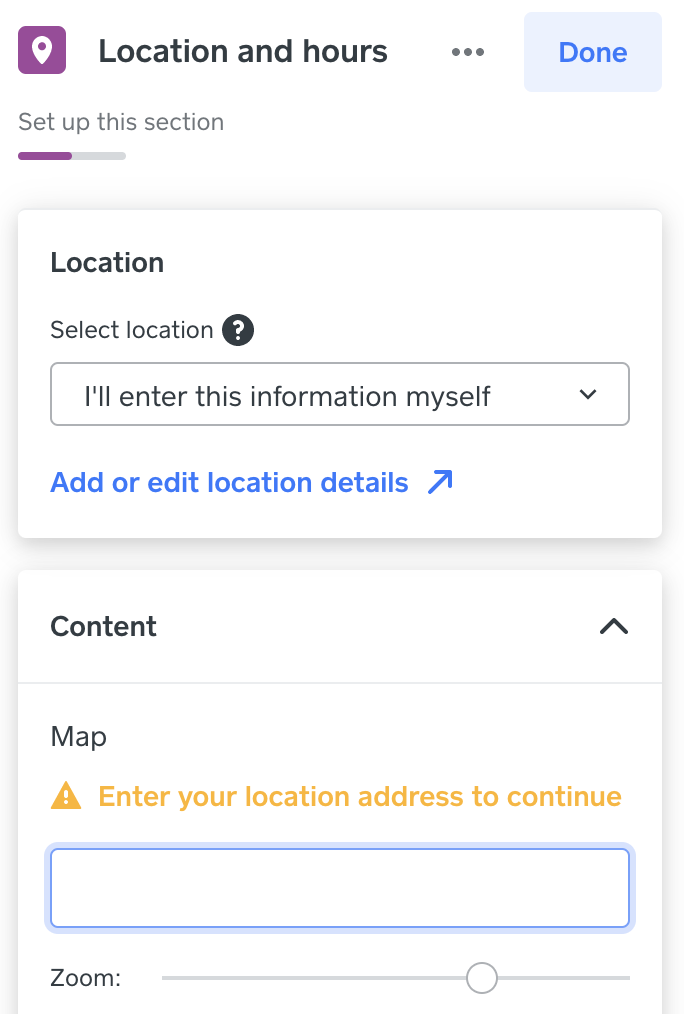
I hope this helps! 💫
Community Moderator, Square
Sign in and click Mark as Best Answer if my reply answers your question.
- Mark as New
- Bookmark
- Subscribe
- Subscribe to RSS Feed
- Permalink
- Report
- Subscribe to RSS Feed
- Mark Thread as New
- Mark Thread as Read
- Float this Thread for Current User
- Bookmark
- Subscribe
- Printer Friendly Page
The information on my locations in Square. Is correct. The information is not being updated on the website side. It still shows the old information.
Next time I’m at my computer I’ll got for the manual option. Thanks
- Mark as New
- Bookmark
- Subscribe
- Subscribe to RSS Feed
- Permalink
- Report
- Subscribe to RSS Feed
- Mark Thread as New
- Mark Thread as Read
- Float this Thread for Current User
- Bookmark
- Subscribe
- Printer Friendly Page
I recommend getting in touch with our team directly if you're concerned about the information not properly updating, however the manual option above should work for you in the meantime, @sodanerdy! 😊
Community Moderator, Square
Sign in and click Mark as Best Answer if my reply answers your question.
- Mark as New
- Bookmark
- Subscribe
- Subscribe to RSS Feed
- Permalink
- Report
- Subscribe to RSS Feed
- Mark Thread as New
- Mark Thread as Read
- Float this Thread for Current User
- Bookmark
- Subscribe
- Printer Friendly Page
I updated it manually for now. Thanks for your help.
- Mark as New
- Bookmark
- Subscribe
- Subscribe to RSS Feed
- Permalink
- Report

Square Community
Square Products