
- Home
- >
- Help
- >
- Orders & Catalog
- >
- Report to show stock by vendor

- Subscribe to RSS Feed
- Mark Thread as New
- Mark Thread as Read
- Float this Thread for Current User
- Bookmark
- Subscribe
- Printer Friendly Page
I am struggling to find reports that show my stock as a monetary value.
Is there anyway to do a report showing how much stock I have by Vendor?
Thanks
Val



- Subscribe to RSS Feed
- Mark Thread as New
- Mark Thread as Read
- Float this Thread for Current User
- Bookmark
- Subscribe
- Printer Friendly Page
Hi @Valindia thanks for your post.
If you are subscribed to Square for Retail plus, there's a few different reports that you can generate.
By visiting the Vendor Sales Report in your online Square Dashboard, you can view which items are sold in a given time frame, sorted by vendor.
The Projected Profit report looks at the inventory you have in stock with an associated cost and price and calculates your potential profit.
It sounds like you a looking for a mix of the two - Projected Profit via Vendor? At the moment the Projected Profit report can only be filtered by location or category, filtering potential profit by vendors is not an option.
I can see how this would be really beneficial though so I'll sure to share your idea with our product team.
Community Moderator, Ireland, Square
Sign in and click Mark as Best Answer if my reply answers your question ✨
After a wonderful three years supporting the Seller Community, I've moved teams!
Check out article "A Contact Guide to the Seller Community" to reach out to current Seller Community Moderators.
Thank you for all the memories and connections—here’s to new adventures!
- Mark as New
- Bookmark
- Subscribe
- Subscribe to RSS Feed
- Permalink
- Report
- Subscribe to RSS Feed
- Mark Thread as New
- Mark Thread as Read
- Float this Thread for Current User
- Bookmark
- Subscribe
- Printer Friendly Page
Hi @Valindia thanks for your post.
If you are subscribed to Square for Retail plus, there's a few different reports that you can generate.
By visiting the Vendor Sales Report in your online Square Dashboard, you can view which items are sold in a given time frame, sorted by vendor.
The Projected Profit report looks at the inventory you have in stock with an associated cost and price and calculates your potential profit.
It sounds like you a looking for a mix of the two - Projected Profit via Vendor? At the moment the Projected Profit report can only be filtered by location or category, filtering potential profit by vendors is not an option.
I can see how this would be really beneficial though so I'll sure to share your idea with our product team.
Community Moderator, Ireland, Square
Sign in and click Mark as Best Answer if my reply answers your question ✨
After a wonderful three years supporting the Seller Community, I've moved teams!
Check out article "A Contact Guide to the Seller Community" to reach out to current Seller Community Moderators.
Thank you for all the memories and connections—here’s to new adventures!
- Mark as New
- Bookmark
- Subscribe
- Subscribe to RSS Feed
- Permalink
- Report
- Subscribe to RSS Feed
- Mark Thread as New
- Mark Thread as Read
- Float this Thread for Current User
- Bookmark
- Subscribe
- Printer Friendly Page
Hi, what I am after is a report which shows total inventory by Vendor.
so the top line is £60000 inventory and broken down into Tesco £10000, Sainsburys £10,000 etc
it helps to know what stock you are carrying at a glance
thanks
Val
- Mark as New
- Bookmark
- Subscribe
- Subscribe to RSS Feed
- Permalink
- Report
- Subscribe to RSS Feed
- Mark Thread as New
- Mark Thread as Read
- Float this Thread for Current User
- Bookmark
- Subscribe
- Printer Friendly Page
Thanks for the context @Valindia, I double checked with the team but this would be a feature request. The closest would be the projected profit report. Within this report you can filter by date, location and category.
I can see how a stock per vendor report would be useful though for plenty of businesses so I'll be sure to raise this as a request with the product team. Hopefully it will be something we can offer in future.
Community Moderator, Ireland, Square
Sign in and click Mark as Best Answer if my reply answers your question ✨
After a wonderful three years supporting the Seller Community, I've moved teams!
Check out article "A Contact Guide to the Seller Community" to reach out to current Seller Community Moderators.
Thank you for all the memories and connections—here’s to new adventures!
- Mark as New
- Bookmark
- Subscribe
- Subscribe to RSS Feed
- Permalink
- Report



- Subscribe to RSS Feed
- Mark Thread as New
- Mark Thread as Read
- Float this Thread for Current User
- Bookmark
- Subscribe
- Printer Friendly Page
Hello @Breffni
Related to this issue: we need to be able to export the purchase orders to a spreadsheet. Currently, this is not possible and this is a problem for us.
Thank you.
- Mark as New
- Bookmark
- Subscribe
- Subscribe to RSS Feed
- Permalink
- Report

- Subscribe to RSS Feed
- Mark Thread as New
- Mark Thread as Read
- Float this Thread for Current User
- Bookmark
- Subscribe
- Printer Friendly Page
Hi @nell_a,
Happy to help with this question!
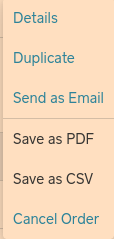
You can export purchase orders to csv file. To export your Purchase Order, sign into your Square Dashboard and visit Items > Item Management > Purchase Orders.
On this page, you can select a specific order to edit, or you can just export your specific purchase order directly from the main Purchase Orders page by clicking the three horizontal dots on the last part of the rows.
Here is another thread with some more insight .
I hope this is what you are looking for! Please let me know if I can help or answer any more questions.
Square Community Moderator
Sign in and click Mark as Best Answer if my reply answers your question ✨
- Mark as New
- Bookmark
- Subscribe
- Subscribe to RSS Feed
- Permalink
- Report
- Subscribe to RSS Feed
- Mark Thread as New
- Mark Thread as Read
- Float this Thread for Current User
- Bookmark
- Subscribe
- Printer Friendly Page
Hi @MayaP
Thank you, but we actually need a way to export a summary of all purchase orders, i.e. the information is shown on this page: https://squareup.com/dashboard/items/inventory/purchase-orders, to a single csv file, much the same way there is an EXPORT button at the top of the Customer Directory to all customers to a single csv file.
Thank you.
- Mark as New
- Bookmark
- Subscribe
- Subscribe to RSS Feed
- Permalink
- Report
- Subscribe to RSS Feed
- Mark Thread as New
- Mark Thread as Read
- Float this Thread for Current User
- Bookmark
- Subscribe
- Printer Friendly Page
A user on the US site is requesting the same thing.
Exporting the PO one by one doesn't really help me; what I am looking to do is to see all my open PO's (not received) on a weekly basis without having to download each PO every week.
- Mark as New
- Bookmark
- Subscribe
- Subscribe to RSS Feed
- Permalink
- Report
- Subscribe to RSS Feed
- Mark Thread as New
- Mark Thread as Read
- Float this Thread for Current User
- Bookmark
- Subscribe
- Printer Friendly Page
Hi @nell_a,
Thank you for clarifying.
At this time, this is a feature request. Although this feature isn’t currently available with Square, it’s a great idea and I can see how it would be beneficial to your business.
I’ve shared your feature request with our Product Team, as they are constantly improving our products based on feedback like this. To learn more about how feature requests work, please see this post from one of our Seller Community Moderators.
In the meantime, keep an eye out for any updates, here, in our Seller Community. We appreciate your input!
Square Community Moderator
Sign in and click Mark as Best Answer if my reply answers your question ✨

Square Community
Square Products