
- Home
- >
- Help
- >
- Online Store
- >
- Re: There was an error. Please try again. Customer...

- Subscribe to RSS Feed
- Mark Thread as New
- Mark Thread as Read
- Float this Thread for Current User
- Bookmark
- Subscribe
- Printer Friendly Page
There was an error. Please try again. Customers can't add items to their cart (Please help!)
For about a week or so, customers haven't been able to add items to their cart and see the error "There was an error. Please try again." See attached

Has anyone else been experiencing this? I saw a thread that said it might be a domain issue, but I'm not sure how to fix that. I saw that when I go to my website through my linktree, it works perfectly fine.
Here is my website just in case: www.honeylovepress.com
Thanks!!
- Mark as New
- Bookmark
- Subscribe
- Subscribe to RSS Feed
- Permalink
- Report
- Subscribe to RSS Feed
- Mark Thread as New
- Mark Thread as Read
- Float this Thread for Current User
- Bookmark
- Subscribe
- Printer Friendly Page
Yes I’ve been having this error since the beginning of the month. I have lost a lot of sales from this and money from paid ads where people are clicking but can’t checkout.
- Mark as New
- Bookmark
- Subscribe
- Subscribe to RSS Feed
- Permalink
- Report



- Subscribe to RSS Feed
- Mark Thread as New
- Mark Thread as Read
- Float this Thread for Current User
- Bookmark
- Subscribe
- Printer Friendly Page
Hi @honeylovepress and @beta1 - I'm sorry to hear that this issue with your Square Online Store has brought you to the Seller Community! 😥
I just checked both of your websites and was able to add the following items to my cart. It's possible that this error has been resolved since your customers reported it.

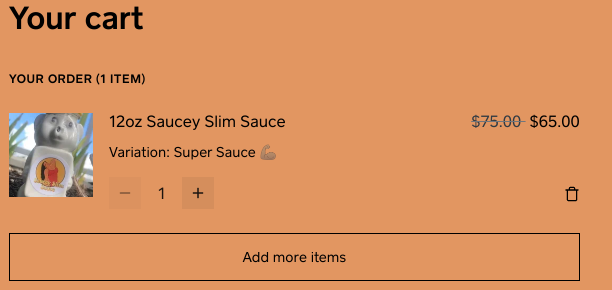
Please do let me know if you or your customers are still experiencing issues with your Online Stores!
Community Moderator, Square
Sign in and click Mark as Best Answer if my reply answers your question.
- Mark as New
- Bookmark
- Subscribe
- Subscribe to RSS Feed
- Permalink
- Report
- Subscribe to RSS Feed
- Mark Thread as New
- Mark Thread as Read
- Float this Thread for Current User
- Bookmark
- Subscribe
- Printer Friendly Page
Yes we are still experiencing this issue. Sales are drastically low according to analytics plus a new highly anticipated item has dropped and mere sales are being made. The issue is not happening to everyone so I can’t see it for myself just like you can’t, but it’s drastically interfering with sales. This has been going on since the beginning of this year.
- Mark as New
- Bookmark
- Subscribe
- Subscribe to RSS Feed
- Permalink
- Report
- Subscribe to RSS Feed
- Mark Thread as New
- Mark Thread as Read
- Float this Thread for Current User
- Bookmark
- Subscribe
- Printer Friendly Page

- Mark as New
- Bookmark
- Subscribe
- Subscribe to RSS Feed
- Permalink
- Report
- Subscribe to RSS Feed
- Mark Thread as New
- Mark Thread as Read
- Float this Thread for Current User
- Bookmark
- Subscribe
- Printer Friendly Page
Hi again, @beta1 - Thanks for following up with me. I'm sorry to hear that you and your customers are still experiencing this issue.
Since the screenshot you shared is on mobile, I'm wondering if this issue could be exclusive to the mobile version of Square Online Store 🤔 As for our next steps, I suggest that you get in touch with our Support Team via phone or email.
The best way to reach out is by phone because our team can look at your account with you and help you make adjustments in real-time. If you haven't already, please reach out directly by logging into your Square account and heading here.
Community Moderator, Square
Sign in and click Mark as Best Answer if my reply answers your question.
- Mark as New
- Bookmark
- Subscribe
- Subscribe to RSS Feed
- Permalink
- Report
- Subscribe to RSS Feed
- Mark Thread as New
- Mark Thread as Read
- Float this Thread for Current User
- Bookmark
- Subscribe
- Printer Friendly Page
Here’s what happened to someone on desktop
- Mark as New
- Bookmark
- Subscribe
- Subscribe to RSS Feed
- Permalink
- Report
- Subscribe to RSS Feed
- Mark Thread as New
- Mark Thread as Read
- Float this Thread for Current User
- Bookmark
- Subscribe
- Printer Friendly Page

- Mark as New
- Bookmark
- Subscribe
- Subscribe to RSS Feed
- Permalink
- Report
- Subscribe to RSS Feed
- Mark Thread as New
- Mark Thread as Read
- Float this Thread for Current User
- Bookmark
- Subscribe
- Printer Friendly Page
I'm having the same problem and can't make any sales, I've tried everything.
- Mark as New
- Bookmark
- Subscribe
- Subscribe to RSS Feed
- Permalink
- Report

- Subscribe to RSS Feed
- Mark Thread as New
- Mark Thread as Read
- Float this Thread for Current User
- Bookmark
- Subscribe
- Printer Friendly Page
Hello @WCS21 @beta1 , we are so sorry for any inconvenience but it was a disruption we were having with the system. The issue has since been resolved. If you continue to have problems please reach out to support 1-855-700-6000 squ.re/contactsqsupport so we can help resolve this. Thank you for working with us on this!
Square Community Moderator
Sign in and click Mark as Best Answer if my reply answers your question ✨
- Mark as New
- Bookmark
- Subscribe
- Subscribe to RSS Feed
- Permalink
- Report

Square Community
Square Products