
- Home
- >
- Help
- >
- Online Store
- >
- Setting up Multiple Locations on Square Online

- Subscribe to RSS Feed
- Mark Thread as New
- Mark Thread as Read
- Float this Thread for Current User
- Bookmark
- Subscribe
- Printer Friendly Page
Setting up Multiple Locations on Square Online
Hello, How do I setup multiple location on our free square online site? We currently have 1 location setup. However I now need to add another. And need to have time based categories as its for school canteen.
The other site is a uniform shop.
Many thanks,
Sacha
- Mark as New
- Bookmark
- Subscribe
- Subscribe to RSS Feed
- Permalink
- Report



- Subscribe to RSS Feed
- Mark Thread as New
- Mark Thread as Read
- Float this Thread for Current User
- Bookmark
- Subscribe
- Printer Friendly Page
It sounds like you've already set up a second location in your Square Dashboard, @BalmoralPnC, so the next step would be to enable the other location(s) from your Square Online dashboard:
1. Select Fulfillment > Pickup & Delivery.
2. Toggle on the pickup and/or delivery switch for the location you'd like to set up.
3. Set up your second location according to your opening hours and hit save when you're done.
If you'd like to set up a separate website, you can also do so under another location with this guide. Let us know how you go!
- Mark as New
- Bookmark
- Subscribe
- Subscribe to RSS Feed
- Permalink
- Report
- Subscribe to RSS Feed
- Mark Thread as New
- Mark Thread as Read
- Float this Thread for Current User
- Bookmark
- Subscribe
- Printer Friendly Page
Thanks Arie
Is it best then to setup 2 separate sites? I'd prefer them to be on the one site with separate Order Now buttons - for uniforms and for canteen.
How do we do that?
How do we export separate orders?
And we can switch off emails right so we're not bombarded with all order emails confirmations? When I did a test run purchase for canteen the email said it was coming from other location even though I had it setup as specific for canteen email.
- Mark as New
- Bookmark
- Subscribe
- Subscribe to RSS Feed
- Permalink
- Report
- Subscribe to RSS Feed
- Mark Thread as New
- Mark Thread as Read
- Float this Thread for Current User
- Bookmark
- Subscribe
- Printer Friendly Page
There would be an option to choose which location customers would like to pick up / place the order from @BalmoralPnC. This is what it looks like on my site:
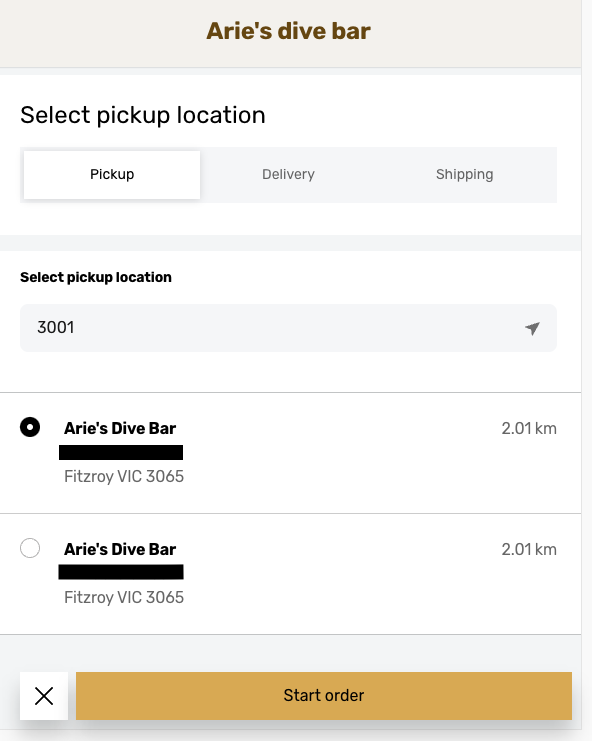
You could call your locations "Uniform Shop" or "Canteen" in this case.
Order emails would be sent to the same email address. You can turn off order emails from your Online Store Dashboard by selecting Settings > Notifications or Shared Settings > Notifications if you have more than one site.
- Mark as New
- Bookmark
- Subscribe
- Subscribe to RSS Feed
- Permalink
- Report

Square Community
Square Products