

- Subscribe to RSS Feed
- Mark Thread as New
- Mark Thread as Read
- Float this Thread for Current User
- Bookmark
- Subscribe
- Printer Friendly Page
Invoice Report - Recurring Invoices & Monthly Projections
Does anyone have a workaround for the following or potentially seen anything on when Square would be implementing:
a) Recurring invoices showing current first. Having to scroll to the bottom to see the upcoming invoices is a nuisance. I need to be able to control this being ascending/descending.
b) A projected day, week, monthly or custom report for recurring invoices.
c) Invoices only showing the current one (series details) vs each invoice individually (for a specified amount of time). When currently MANUALLY projecting numbers 🙄, I have to create an excel calendar based off which invoices should run in the time frame (I have to put the invoice totals in weekly, bi-weekly, etc) vs the system automatically showing each invoice in the series.
- Mark as New
- Bookmark
- Subscribe
- Subscribe to RSS Feed
- Permalink
- Report



- Subscribe to RSS Feed
- Mark Thread as New
- Mark Thread as Read
- Float this Thread for Current User
- Bookmark
- Subscribe
- Printer Friendly Page
Hi there @IAmMyBillboard, thanks for reaching out.
Where are you seeing recurring invoices appearing as descending rather than ascending?
Square Dashboard > Invoices > Overview or
Square Dashboard > Invoices > Recurring?
Currently we don't offer a report just for recurring invoices. I will make sure to share this suggestion with our Product Team!
You can navigate to the Invoices Tab on the Square Dashboard you can view all your recurring invoices by hitting the recurring option in the top right corner. You can look at a specific time frame using the date drop down in the top left corner!
Community Moderator, Ireland, Square
Sign in and click Mark as Best Answer if my reply answers your question ✨
After a wonderful three years supporting the Seller Community, I've moved teams!
Check out article "A Contact Guide to the Seller Community" to reach out to current Seller Community Moderators.
Thank you for all the memories and connections—here’s to new adventures!
- Mark as New
- Bookmark
- Subscribe
- Subscribe to RSS Feed
- Permalink
- Report
- Subscribe to RSS Feed
- Mark Thread as New
- Mark Thread as Read
- Float this Thread for Current User
- Bookmark
- Subscribe
- Printer Friendly Page
Dashboard > Invoices (Overview) > Invoices > *filter: Scheduled
With this filter I have to scroll all the way to the bottom to see the most recent/uncoming invoices. I just checked again before responding and I see 2023 first, instead of seeing November 2022 first and scrolling to see invoices for 2023 last.
- Mark as New
- Bookmark
- Subscribe
- Subscribe to RSS Feed
- Permalink
- Report

- Subscribe to RSS Feed
- Mark Thread as New
- Mark Thread as Read
- Float this Thread for Current User
- Bookmark
- Subscribe
- Printer Friendly Page
I apologize for the confusion here @IAmMyBillboard. At this time, The Square Invoices page doesn't have Sorting Option. The only way to filter to see the invoices you want would be by selecting the time frame you wish to work with.
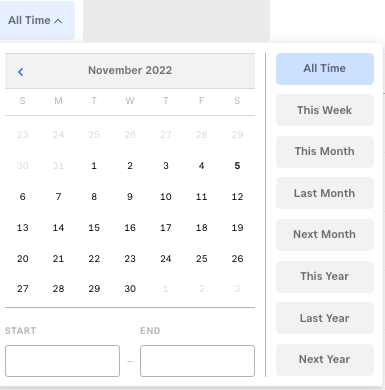
I hope this information is helpful!
Community Moderator, Square
Sign in and click Mark as Best Answer if my reply answers your question.
- Mark as New
- Bookmark
- Subscribe
- Subscribe to RSS Feed
- Permalink
- Report

Square Community
Square Products