

- Subscribe to RSS Feed
- Mark Thread as New
- Mark Thread as Read
- Float this Thread for Current User
- Bookmark
- Subscribe
- Printer Friendly Page
background images appearing differently between desktop and mobile modes
- Mark as New
- Bookmark
- Subscribe
- Subscribe to RSS Feed
- Permalink
- Report



- Subscribe to RSS Feed
- Mark Thread as New
- Mark Thread as Read
- Float this Thread for Current User
- Bookmark
- Subscribe
- Printer Friendly Page
Hi @L5motorsport,
Thanks for writing in and welcome to the seller community 🙂
Sorry to hear about the trouble with your website. Background images will load differently, depending on the size of the screen they're displayed on. It would be great if you could send through a link to your site, so we can take a look!
- Mark as New
- Bookmark
- Subscribe
- Subscribe to RSS Feed
- Permalink
- Report
- Subscribe to RSS Feed
- Mark Thread as New
- Mark Thread as Read
- Float this Thread for Current User
- Bookmark
- Subscribe
- Printer Friendly Page
Hi Arie,
Thank you so much for responding to me.
There are three things that I am having trouble with.
1. Images displaying differently between desk top and mobile
2. I would like to add parallax scrolling to my site (image of white car), would you know if this is possible? This seems to be a common feature with other sites such as wix, squarespace etc.
3. A better way to display testimonials - is there a way viewers can scroll through (left to right) the testimonials on my home page like a "what customers are saying" type thing. This seems to be a common feature with other sites such as wix, squarespace etc.
In case you can't tell - this is my first time building a website and tech isn't my thing so I greatly appreciate any advice or assistance.
web address is; www.l5motorsport.com.au
Thank you for your time.
- Mark as New
- Bookmark
- Subscribe
- Subscribe to RSS Feed
- Permalink
- Report
- Subscribe to RSS Feed
- Mark Thread as New
- Mark Thread as Read
- Float this Thread for Current User
- Bookmark
- Subscribe
- Printer Friendly Page
Loving the Tesla on your main page @L5motorsport!
I visited your site both on a desktop computer, and an iPhone, and see what you mean. The image ratio will change depending on where you're visiting the website from, so this isn't something you can change from your end.
In regards to displaying images to scroll laterally, you could set up a gallery or slideshow with this guide. For your testimonials, you can display two testimonials next to each other, but I wasn't able to find a way to turn this into a slide show, but here's how you can display two reviews next to each other:
1. Log in to your Square Online Dashboard.
2. Select Website > Edit Site.
3. Select add section > Customer Testimonials.
4. Click on the section once more to customise it further.
5. From here, you click on the drop down under columns, and select 2.
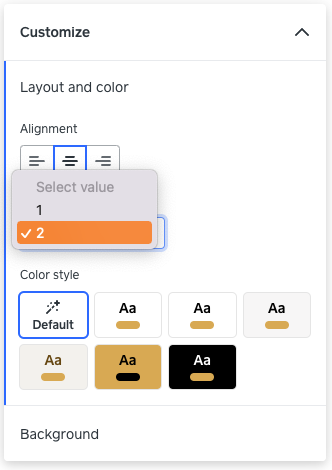
6. Click publish once you're done.
This is what your testimonials section would look like after:

I hope this helps!
- Mark as New
- Bookmark
- Subscribe
- Subscribe to RSS Feed
- Permalink
- Report

Square Community
Square Products