

- Subscribe to RSS Feed
- Mark Thread as New
- Mark Thread as Read
- Float this Thread for Current User
- Bookmark
- Subscribe
- Printer Friendly Page
DNS setting
Hi there,
- Mark as New
- Bookmark
- Subscribe
- Subscribe to RSS Feed
- Permalink
- Report



- Subscribe to RSS Feed
- Mark Thread as New
- Mark Thread as Read
- Float this Thread for Current User
- Bookmark
- Subscribe
- Printer Friendly Page
Hey @terrynguyen,
Thanks for writing in! Welcome to the Seller Community 🙂 👋
I'm sorry to hear you're having trouble with your domain. You can edit your DNS settings from your Square Online Dashboard. From there, click on the arrow next to your business name and select > Domain.
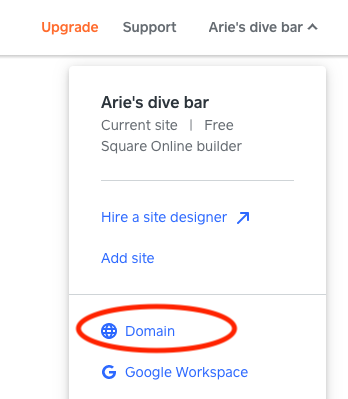
From there, you'll be able to select your domain and click Edit next to DNS RECORDS to make your changes. Once you're finished, select Save.
If you're having trouble navigating to these settings, reach out to our support team on 1800 760 137, from Mon-Fri, 9am-5pm Melbourne time, or contact us via online chat or email here.
- Mark as New
- Bookmark
- Subscribe
- Subscribe to RSS Feed
- Permalink
- Report
- Subscribe to RSS Feed
- Mark Thread as New
- Mark Thread as Read
- Float this Thread for Current User
- Bookmark
- Subscribe
- Printer Friendly Page
Hi Arie,
Thank you so much for your reply, I did that many time but all i see is this. It keeps asking me to purchased a domain again and again. I dont see anything that say "Edit"
Thank you so much

- Mark as New
- Bookmark
- Subscribe
- Subscribe to RSS Feed
- Permalink
- Report
- Subscribe to RSS Feed
- Mark Thread as New
- Mark Thread as Read
- Float this Thread for Current User
- Bookmark
- Subscribe
- Printer Friendly Page
In this case, I'd definitely recommend to give our CS team a call, @terrynguyen. They'll be able to look into your settings further, as I'm not able to look into account specifics via this forum.
Please let us know how you go!
- Mark as New
- Bookmark
- Subscribe
- Subscribe to RSS Feed
- Permalink
- Report

Square Community
Square Products