

- Subscribe to RSS Feed
- Mark Thread as New
- Mark Thread as Read
- Float this Thread for Current User
- Bookmark
- Subscribe
- Printer Friendly Page
We have an online store and a physical shop. They are both linked to the same back end databases (OK, they aren't but they do synchronise).
Is there a way I can find out what we sold in the shop, where we use a Square card reader/till to do all the transactions? I can't seem to find a way to do this. All I get are total amounts spent emailed to me for each transaction.
I want to do it because I want to find out what sells best in the shop and what sells best from our online store.
Any advice appreciated
thanks
Alan
- Mark as New
- Bookmark
- Subscribe
- Subscribe to RSS Feed
- Permalink
- Report



- Subscribe to RSS Feed
- Mark Thread as New
- Mark Thread as Read
- Float this Thread for Current User
- Bookmark
- Subscribe
- Printer Friendly Page
Hi @alansh, thanks for your post. If you are using Square Online and Square POS app, you can filter the source of your transactions from your Dashboard. This way you can see your online sale and in-store sales.
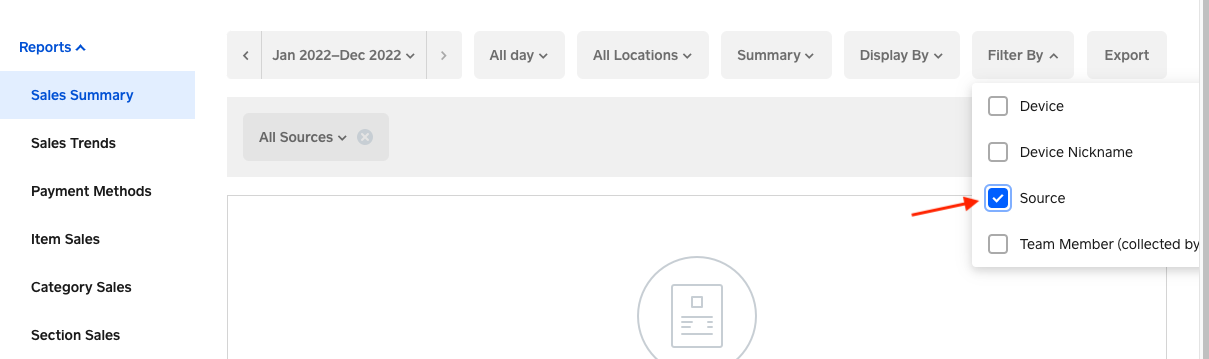
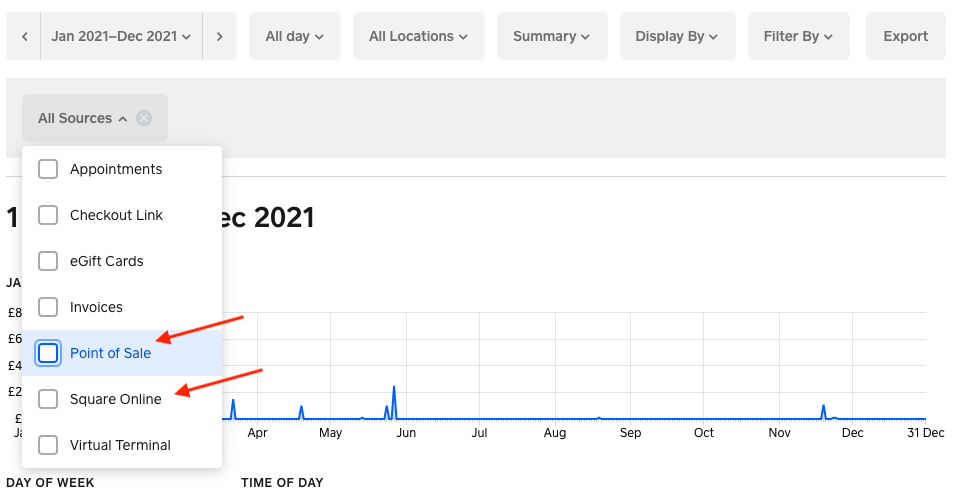
To do so, please go to Dashboard > Reports > Sales Summary > Filter by > Select Source > Click on the arrow next to All sources > Select Square Online for online sales or Point of Sale for in-store sales summary. Here is a screenshot for you.
Community Manager, Square
- Mark as New
- Bookmark
- Subscribe
- Subscribe to RSS Feed
- Permalink
- Report
- Subscribe to RSS Feed
- Mark Thread as New
- Mark Thread as Read
- Float this Thread for Current User
- Bookmark
- Subscribe
- Printer Friendly Page
Hi @alansh, thanks for your post. If you are using Square Online and Square POS app, you can filter the source of your transactions from your Dashboard. This way you can see your online sale and in-store sales.
To do so, please go to Dashboard > Reports > Sales Summary > Filter by > Select Source > Click on the arrow next to All sources > Select Square Online for online sales or Point of Sale for in-store sales summary. Here is a screenshot for you.
Community Manager, Square
- Mark as New
- Bookmark
- Subscribe
- Subscribe to RSS Feed
- Permalink
- Report
- Subscribe to RSS Feed
- Mark Thread as New
- Mark Thread as Read
- Float this Thread for Current User
- Bookmark
- Subscribe
- Printer Friendly Page
Emma, Thanks for that, but it doesn't tell me what I have sold in the shop. It just gives me a summary of the amount I have taken. Ah- but if I click on Item Sales, then I can get the list between dates.
Thank you. I think that solves it.
regards
Alan
- Subscribe to RSS Feed
- Mark Thread as New
- Mark Thread as Read
- Float this Thread for Current User
- Bookmark
- Subscribe
- Printer Friendly Page
I'm glad you found the report you were looking for.
Community Manager, Square
- Mark as New
- Bookmark
- Subscribe
- Subscribe to RSS Feed
- Permalink
- Report

Square Community
Square Products