

- Subscribe to RSS Feed
- Mark Thread as New
- Mark Thread as Read
- Float this Thread for Current User
- Bookmark
- Subscribe
- Printer Friendly Page
Our website gone down
Is anyone else experiencing website issues.....ours has gone down completly
- Mark as New
- Bookmark
- Subscribe
- Subscribe to RSS Feed
- Permalink
- Report



- Subscribe to RSS Feed
- Mark Thread as New
- Mark Thread as Read
- Float this Thread for Current User
- Bookmark
- Subscribe
- Printer Friendly Page
Hi @112york, we're sorry to hear you're experiencing this issue with your site.
We're not aware of any issues impacting Square Online sites at this time. For the latest status updates, you can always check: issquareup.com
When we see these offline issues, we usually start by reviewing your domain settings to ensure this isn't impacting your site visibility. Have a read through these troubleshooting steps to get started.
Let us know if you have any further questions here.
Community Moderator, Australia, Square
Sign in and click Mark as Best Answer if my reply answers your question.
- Mark as New
- Bookmark
- Subscribe
- Subscribe to RSS Feed
- Permalink
- Report
- Subscribe to RSS Feed
- Mark Thread as New
- Mark Thread as Read
- Float this Thread for Current User
- Bookmark
- Subscribe
- Printer Friendly Page
I have been having issues with my website, customers are saying they receive 404 error messages or messages saying my website is unsafe?? Any one know what I can do to fix this as I’m pulling my hair out with this website issue as it’s been working fine then all for a sudden iv started having these issues
- Mark as New
- Bookmark
- Subscribe
- Subscribe to RSS Feed
- Permalink
- Report

- Subscribe to RSS Feed
- Mark Thread as New
- Mark Thread as Read
- Float this Thread for Current User
- Bookmark
- Subscribe
- Printer Friendly Page
I'm sorry to hear about the trouble with your site, @Julz96! Can you please include a link so we can take a look?
- Mark as New
- Bookmark
- Subscribe
- Subscribe to RSS Feed
- Permalink
- Report
- Subscribe to RSS Feed
- Mark Thread as New
- Mark Thread as Read
- Float this Thread for Current User
- Bookmark
- Subscribe
- Printer Friendly Page
Hey there! Thanks for getting back to me 😊 it’s www.candelixir.com.au
- Mark as New
- Bookmark
- Subscribe
- Subscribe to RSS Feed
- Permalink
- Report
- Subscribe to RSS Feed
- Mark Thread as New
- Mark Thread as Read
- Float this Thread for Current User
- Bookmark
- Subscribe
- Printer Friendly Page
Thanks @Julz96!
Your site is secure, and I was able to proceed to the checkout successfully both on Chrome, and Safari. You can see if a site is secure by checking for the small lock in your address bar:
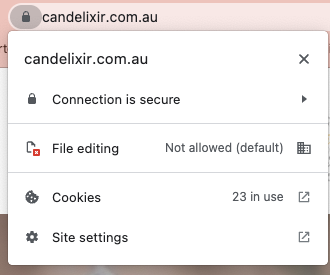
When were you coming across this error message? It's possible you might have been impacted by a brief interruption to Square Online services on the 13th, or 14th of September, where some sellers reported issues with their sites loading. If you just recently set up a custom domain, it might also be worth clearing the cache on your browser, in case a cached version of your site is loading. To clear your cache on Chrome, follow these steps:
- At the top right, click More .
- Click More tools. Clear browsing data.
- At the top, choose a time range. To delete everything, select All time.
- Next to "Cookies and other site data" and "Cached images and files," check the boxes.
- Click Clear data.
Please let us know how you go!
- Mark as New
- Bookmark
- Subscribe
- Subscribe to RSS Feed
- Permalink
- Report
- Subscribe to RSS Feed
- Mark Thread as New
- Mark Thread as Read
- Float this Thread for Current User
- Bookmark
- Subscribe
- Printer Friendly Page
Hey there,
thanks for that! At the moment it’s working but occasionally it gives my customers a broken link where it says error unsafe or takes them to a blank error page. Iv noticed it does this also when I’m connected to my wifi and I log on but if I use my mobile internet the website is fine - if that makes sense
it’s just bazar unless my wifi security settings are seeing my website as some sort of threat so it’s not allowing access but not sure just baffles me that after all this time it’s suddenly playing up.
- Mark as New
- Bookmark
- Subscribe
- Subscribe to RSS Feed
- Permalink
- Report
- Subscribe to RSS Feed
- Mark Thread as New
- Mark Thread as Read
- Float this Thread for Current User
- Bookmark
- Subscribe
- Printer Friendly Page
Hi, @Julz96, just jumping in for @Arie here while they're out of the office!
It is interesting that the site seems to be working intermittently for you when switching between networks. I've clicked on your site link to test this behaviour again today and it's still loading fine on my end via both Safari and Chrome browsers on my desktop. I've currently connected to a Wi-Fi network myself.
The only other step I can think to suggest is to unpublish and publish your site again. This action essentially resyncs all of the data on your site, and hopefully, resolves this issue.
To unpublish your Square Online site:
1. In your Square Online Overview page, go to Website > Site Preferences.
2. Select Unpublish. Then, publish your site again from your Site Editor (or by clicking Publish when the option appears on the current page).
If the issues persist after trying the above, I suggest reaching out to our Support Team here with a screenshot of the error message you are receiving when attempting to access your site. If necessary, they can escalate your case to our Ecom Support Team to take a further look.
You can call support on 1800 760 137 (Mon - Fri, 9 am - 5 pm Melbourne time), or contact us via online chat or email. See the below steps.
1. Sign in to your Square account
2. Head to our contact page https://squ.re/3AWfZs2
3. Go to "Other", then "I don't see my issue"
4. Click "Message us", "Email us" or "Call Us"
Or, if you see the new chatbot help flow, type “support” to bring up a list of contact methods.
Please do not hesitate to reach out on this thread to let us know how you go!
Community Moderator, Australia, Square
Sign in and click Mark as Best Answer if my reply answers your question.
- Mark as New
- Bookmark
- Subscribe
- Subscribe to RSS Feed
- Permalink
- Report
- Subscribe to RSS Feed
- Mark Thread as New
- Mark Thread as Read
- Float this Thread for Current User
- Bookmark
- Subscribe
- Printer Friendly Page
Hi Laurie,
thank you for replying. If I do that will that erase anything or does it just unpublish? Sorry probably a silly question however I don’t want it to delete or reset items on the site in other words don’t want to have to start again 😅
thank you 😊
- Mark as New
- Bookmark
- Subscribe
- Subscribe to RSS Feed
- Permalink
- Report
- Subscribe to RSS Feed
- Mark Thread as New
- Mark Thread as Read
- Float this Thread for Current User
- Bookmark
- Subscribe
- Printer Friendly Page
Not a silly question at all, @Julz96!
So long as you aren't currently working on a site draft, so this is when you're on the Site Editor page, making changes to your site templates for example. Then, it's perfectly safe to unpublish and publish your site again. If you are currently working on changes, then it's best to leave this step for now until you're ready to publish your updates.
This action is like turning the lights off and then on again for your site. As only takes a few seconds, customers will most likely not even notice when it's happening.
We often use this to troubleshoot loading and syncing issues for Square Online sites.
Let me know if you have any further questions about this step and I'll be happy to assist.
Community Moderator, Australia, Square
Sign in and click Mark as Best Answer if my reply answers your question.
- Subscribe to RSS Feed
- Mark Thread as New
- Mark Thread as Read
- Float this Thread for Current User
- Bookmark
- Subscribe
- Printer Friendly Page
Thank you so much for your help! I will try this and let you know how I go 🙂
- Mark as New
- Bookmark
- Subscribe
- Subscribe to RSS Feed
- Permalink
- Report

- Subscribe to RSS Feed
- Mark Thread as New
- Mark Thread as Read
- Float this Thread for Current User
- Bookmark
- Subscribe
- Printer Friendly Page

- Mark as New
- Bookmark
- Subscribe
- Subscribe to RSS Feed
- Permalink
- Report

Square Community
Square Products