

- Subscribe to RSS Feed
- Mark Thread as New
- Mark Thread as Read
- Float this Thread for Current User
- Bookmark
- Subscribe
- Printer Friendly Page
Mark invoice as paid
How do you create an invoice and mark as paid for purpose of sending paid invoice to client?
Can see the MORE option to mark as paid.
- Mark as New
- Bookmark
- Subscribe
- Subscribe to RSS Feed
- Permalink
- Report



- Subscribe to RSS Feed
- Mark Thread as New
- Mark Thread as Read
- Float this Thread for Current User
- Bookmark
- Subscribe
- Printer Friendly Page
Hey @StandInMum12,
Thanks for getting in touch!
The "Mark as Paid" option has been renamed "Record Payment" - the functionality remains the same though 👍
Square, Australia
Sign in and click Mark as Best Answer if my reply answers your question.
- Mark as New
- Bookmark
- Subscribe
- Subscribe to RSS Feed
- Permalink
- Report

- Subscribe to RSS Feed
- Mark Thread as New
- Mark Thread as Read
- Float this Thread for Current User
- Bookmark
- Subscribe
- Printer Friendly Page
WHERE IS THE BUTTON TO DO THIS - CANT FIND ANYWHERE!
- Mark as New
- Bookmark
- Subscribe
- Subscribe to RSS Feed
- Permalink
- Report
- Subscribe to RSS Feed
- Mark Thread as New
- Mark Thread as Read
- Float this Thread for Current User
- Bookmark
- Subscribe
- Printer Friendly Page
Hey @Evrst,
Thanks for your message and welcome to the Seller Community 👋
1. Click on the invoice in question from your Online Dashboard invoices section.
2. Click "More" in the window that appears on the right hand side then "Add Payment":

3. Tick "Record Payment", select your payment type, then press "Confirm".
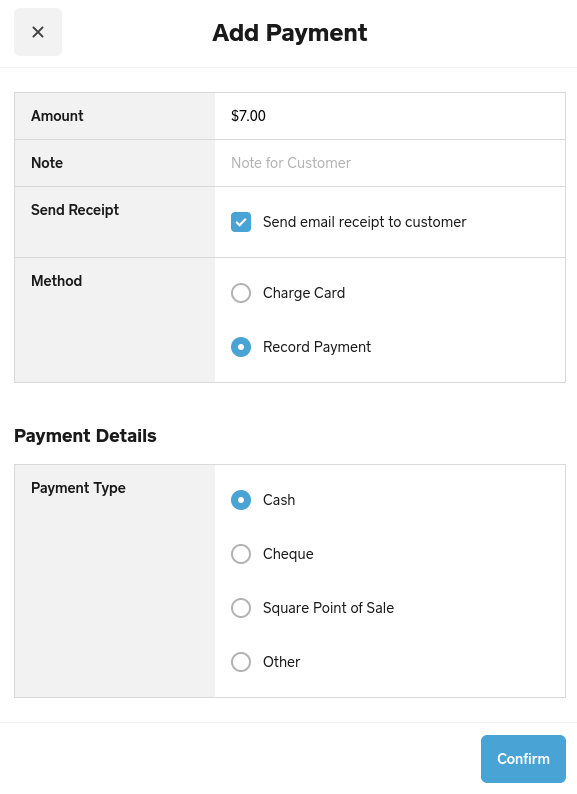
Hope this helps 🙂
Square, Australia
Sign in and click Mark as Best Answer if my reply answers your question.
- Mark as New
- Bookmark
- Subscribe
- Subscribe to RSS Feed
- Permalink
- Report
- Subscribe to RSS Feed
- Mark Thread as New
- Mark Thread as Read
- Float this Thread for Current User
- Bookmark
- Subscribe
- Printer Friendly Page
Can't find more button
- Mark as New
- Bookmark
- Subscribe
- Subscribe to RSS Feed
- Permalink
- Report
- Subscribe to RSS Feed
- Mark Thread as New
- Mark Thread as Read
- Float this Thread for Current User
- Bookmark
- Subscribe
- Printer Friendly Page
Did you click on the invoice in question first, from the Invoices page in the online dashboard?
Square, Australia
Sign in and click Mark as Best Answer if my reply answers your question.
- Mark as New
- Bookmark
- Subscribe
- Subscribe to RSS Feed
- Permalink
- Report

Square Community
Square Products