

- Subscribe to RSS Feed
- Mark Thread as New
- Mark Thread as Read
- Float this Thread for Current User
- Bookmark
- Subscribe
- Printer Friendly Page
Editing quantity of item to cart
Hello!! New to setting up my website and I’ve realised on one off items the customers can select a number of quantity they want. How do you edit this to make it just one item and then it because sold out once bought? Thank you 🙂
- Mark as New
- Bookmark
- Subscribe
- Subscribe to RSS Feed
- Permalink
- Report



- Subscribe to RSS Feed
- Mark Thread as New
- Mark Thread as Read
- Float this Thread for Current User
- Bookmark
- Subscribe
- Printer Friendly Page
Hey @Rusticforager,
Thanks for writing in! I noticed it's your first post, welcome to our community 👋 🙂
Have you enabled stock tracking for your items online? With tracking enabled, you can enter the amount of stock you have available, e.g 1, for your one off items. Here's how:
1. In your Square Online dashboard, head to Items > select and item you want to edit.
2. Scroll down to Additional information and select Update next to stock. Toggle track stock on, add a reason for the restock, and enter the amount of stock you have on hand.
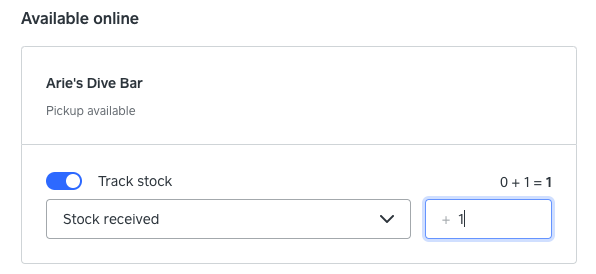
3. Hit Update Stock once you're done 👍
Please let us know how you go!
- Mark as New
- Bookmark
- Subscribe
- Subscribe to RSS Feed
- Permalink
- Report

Square Community
Square Products