

- Subscribe to RSS Feed
- Mark Thread as New
- Mark Thread as Read
- Float this Thread for Current User
- Bookmark
- Subscribe
- Printer Friendly Page
Donation item missing on order page
I have created a donation item to be added to our online site. I have added the item to our home page, but can't get it to show up on the order page. I have added it and it shows up in the order page grid, but when I preview the site or publish it the donation item does not show up. I have added other non donation items and they do show up. Is there a reason why my donation item will not show up on the online order page?
- Mark as New
- Bookmark
- Subscribe
- Subscribe to RSS Feed
- Permalink
- Report



- Subscribe to RSS Feed
- Mark Thread as New
- Mark Thread as Read
- Float this Thread for Current User
- Bookmark
- Subscribe
- Printer Friendly Page
Hi @STJG! Welcome to the Seller Community. I just checked out your Online site- those are some good looking Lenten plates!
I'm seeing your "Makr a Donation to St. James" donation item at the bottom of your listings. Are you saying that you want it to show somewhere else? Or are you not seeing it at all on your Online home page?
Community Program Manager, Square
- Mark as New
- Bookmark
- Subscribe
- Subscribe to RSS Feed
- Permalink
- Report
- Subscribe to RSS Feed
- Mark Thread as New
- Mark Thread as Read
- Float this Thread for Current User
- Bookmark
- Subscribe
- Printer Friendly Page
I believe I am having the same issue. I created an item "When Life Gives You Lemons" and the category "March Donation -Nourish LA". People donate what they can to benefit Nourish LA and I give them 6 lemons from my very abundant tree. The item and category show when I'm in the Website -> Edit Site section, but when I go to preview, it disappears. I've checked all the areas I can think of to see why this isn't showing up. Thanks in advance for the help!
- Mark as New
- Bookmark
- Subscribe
- Subscribe to RSS Feed
- Permalink
- Report

- Subscribe to RSS Feed
- Mark Thread as New
- Mark Thread as Read
- Float this Thread for Current User
- Bookmark
- Subscribe
- Printer Friendly Page
Hey @MortAndBettys!
Welcome to the Seller Community ✨What is your URL? I want to look into this for you 👀

- Mark as New
- Bookmark
- Subscribe
- Subscribe to RSS Feed
- Permalink
- Report
- Subscribe to RSS Feed
- Mark Thread as New
- Mark Thread as Read
- Float this Thread for Current User
- Bookmark
- Subscribe
- Printer Friendly Page
Thank you! It's : https://mort-bettys.square.site/
- Mark as New
- Bookmark
- Subscribe
- Subscribe to RSS Feed
- Permalink
- Report
- Subscribe to RSS Feed
- Mark Thread as New
- Mark Thread as Read
- Float this Thread for Current User
- Bookmark
- Subscribe
- Printer Friendly Page
Thanks @MortAndBettys!
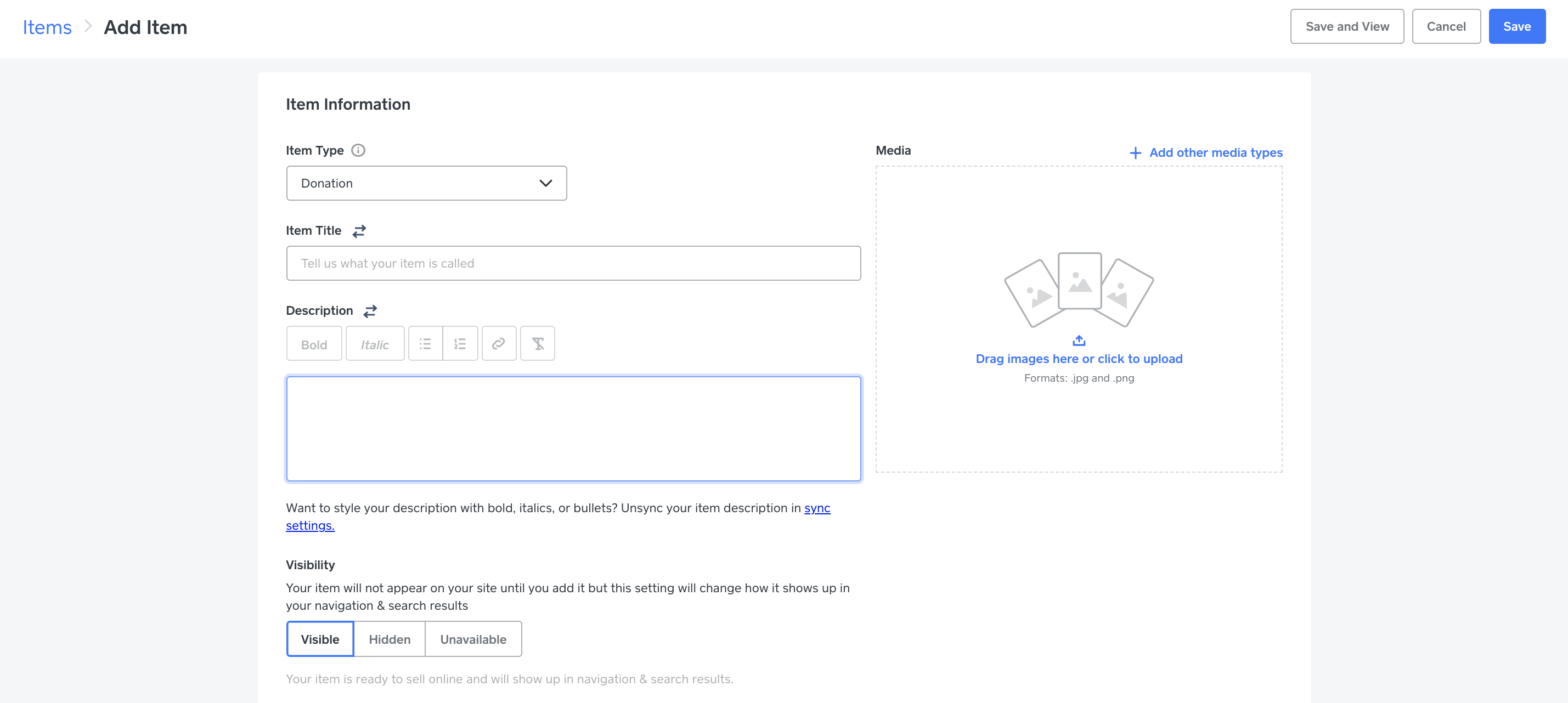
I actually don't see a donation item created. Are you going to Square Online > Items > Donation for item type?
- Mark as New
- Bookmark
- Subscribe
- Subscribe to RSS Feed
- Permalink
- Report
- Subscribe to RSS Feed
- Mark Thread as New
- Mark Thread as Read
- Float this Thread for Current User
- Bookmark
- Subscribe
- Printer Friendly Page
Sounds like you may have made a Checkout Link, which wouldn't show up on your site - just independently as a link @MortAndBettys 💫
- Mark as New
- Bookmark
- Subscribe
- Subscribe to RSS Feed
- Permalink
- Report
- Subscribe to RSS Feed
- Mark Thread as New
- Mark Thread as Read
- Float this Thread for Current User
- Bookmark
- Subscribe
- Printer Friendly Page
Yes, the item title is "When Life Gives Your Lemons".
If I set it up as a link only, how do I change it to an item that will show up in my online store?
- Mark as New
- Bookmark
- Subscribe
- Subscribe to RSS Feed
- Permalink
- Report
- Subscribe to RSS Feed
- Mark Thread as New
- Mark Thread as Read
- Float this Thread for Current User
- Bookmark
- Subscribe
- Printer Friendly Page
You'll have to create the item within Square Online > Items > Create new item > Item Type: Donation, like in the image from my previous post @MortAndBettys!
- Mark as New
- Bookmark
- Subscribe
- Subscribe to RSS Feed
- Permalink
- Report
- Subscribe to RSS Feed
- Mark Thread as New
- Mark Thread as Read
- Float this Thread for Current User
- Bookmark
- Subscribe
- Printer Friendly Page
Ok, I am deleting the original item and starting over. Do I need to do anything with stock? I am not seeing it in the preview 😕
- Subscribe to RSS Feed
- Mark Thread as New
- Mark Thread as Read
- Float this Thread for Current User
- Bookmark
- Subscribe
- Printer Friendly Page
Hey @MortAndBettys! Thanks for the quick reply. Just please make sure when you create the item in Square Online > Items, you're editing the item type to be a donation instead of a physical item. It shouldn't ask you for stock.

- Mark as New
- Bookmark
- Subscribe
- Subscribe to RSS Feed
- Permalink
- Report
- Subscribe to RSS Feed
- Mark Thread as New
- Mark Thread as Read
- Float this Thread for Current User
- Bookmark
- Subscribe
- Printer Friendly Page
Yes, that's what I did but it's still not working. I can see it on the edit page of the store, but when I hit preview it disappears. Are there any other settings that would be preventing this from showing up?
Thank you so much @isabelle for helping me with this! I appreciate it 🙂
- Mark as New
- Bookmark
- Subscribe
- Subscribe to RSS Feed
- Permalink
- Report
- Subscribe to RSS Feed
- Mark Thread as New
- Mark Thread as Read
- Float this Thread for Current User
- Bookmark
- Subscribe
- Printer Friendly Page
Oh no! Okay, well then maybe this is a bug. Please give our Support Team a call today so we can get this set up for you. I don't want you to miss out on any donations @MortAndBettys.
- Mark as New
- Bookmark
- Subscribe
- Subscribe to RSS Feed
- Permalink
- Report

Square Community
Square Products