
- Home
- >
- Help
- >
- Orders & Catalog
- >
- Copy or duplicating Items

- Subscribe to RSS Feed
- Mark Thread as New
- Mark Thread as Read
- Float this Thread for Current User
- Bookmark
- Subscribe
- Printer Friendly Page
Copy or duplicating Items
Can some consideration be given to add the ability to copy or duplicate existing items in the Item Library of the Online Store so the copies can be used as more or less templates to speed up adding items?
- Mark as New
- Bookmark
- Subscribe
- Subscribe to RSS Feed
- Permalink
- Report
- Subscribe to RSS Feed
- Mark Thread as New
- Mark Thread as Read
- Float this Thread for Current User
- Bookmark
- Subscribe
- Printer Friendly Page
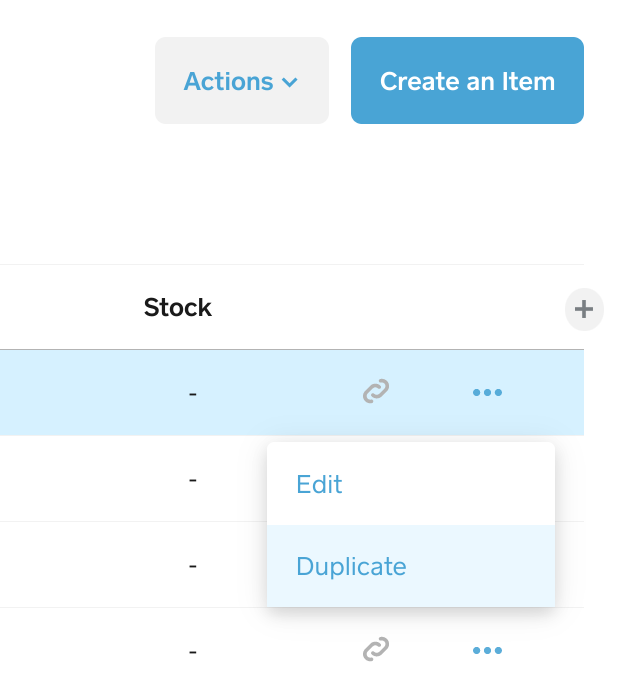
You can duplicate the item in your Square Dashboard and it will sync to your Square Online.
- Mark as New
- Bookmark
- Subscribe
- Subscribe to RSS Feed
- Permalink
- Report



- Subscribe to RSS Feed
- Mark Thread as New
- Mark Thread as Read
- Float this Thread for Current User
- Bookmark
- Subscribe
- Printer Friendly Page
Hey there @PlantSellerYEG!
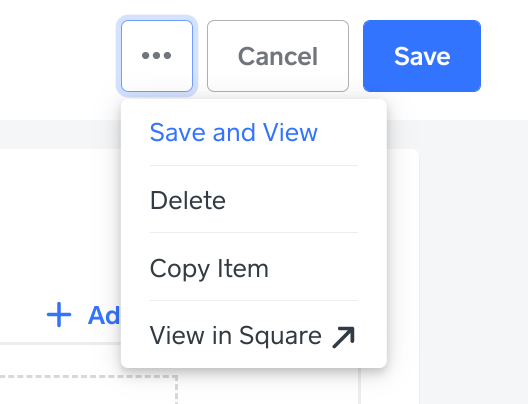
While @Provision is correct, I wanted to chime in as you are also able to duplicate items through the Item Library of your Online overview page. Instead of seeing Duplicate, you'll see Copy Item:
Community Moderator, Square
Sign in and click Mark as Best Answer if my reply answers your question.
- Mark as New
- Bookmark
- Subscribe
- Subscribe to RSS Feed
- Permalink
- Report
- Subscribe to RSS Feed
- Mark Thread as New
- Mark Thread as Read
- Float this Thread for Current User
- Bookmark
- Subscribe
- Printer Friendly Page
Thanks for that. I should have clarified. Is there a way to duplicate a lot of items at once? Like a bulk edit but for duplication?
- Mark as New
- Bookmark
- Subscribe
- Subscribe to RSS Feed
- Permalink
- Report



- Subscribe to RSS Feed
- Mark Thread as New
- Mark Thread as Read
- Float this Thread for Current User
- Bookmark
- Subscribe
- Printer Friendly Page
Hey! Stepping in for Valentina here.
To edit your items in bulk in Square Online, please follow the directions below:
- Go to your Square Online Overview page > Items > Item Library/Site Items.
- If you need to filter your item list so only certain items appear, select Filter. You will be able to use filters such as item Visibility, Stock quantity, Fulfillment, and others. When finished, select Apply filters.
- In the item list, mark the checkbox on the far left of each item you want to edit, and you will see the corresponding editing options appear at the top of the item list under Bulk edit.
Depending on what items you’ve selected, you may see more or less options appear. For instance, if you’ve selected all physical and food item types, then you can bulk edit the items’ category, fulfillment method (e.g. shipping, delivery, pickup), sales tax, and visibility (e.g. visible, hidden, unavailable). If you were to select a physical item, donation item, and membership item, you would only be able to edit the item category and visibility (since those are the only editing options they all have in common).
Community Moderator, Square
Sign in and click Mark as Best Answer if my reply answers your question.
- Mark as New
- Bookmark
- Subscribe
- Subscribe to RSS Feed
- Permalink
- Report

Square Community
Square Products