
- Home
- >
- Help
- >
- Online Store
- >
- Options display order

- Subscribe to RSS Feed
- Mark Thread as New
- Mark Thread as Read
- Float this Thread for Current User
- Bookmark
- Subscribe
- Printer Friendly Page
Options display order
I'm trying to better understand how the order of item options is controlled. I have men's and woman's t-shirts each have 3 options (color, size and sleeve length). On the two detail pages these options are displayed in different orders. I want (top to bottom) to have them the same and in the above order (choose color, select the size then choose the sleeve length).
Can someone help me find/set the display order so that these two detail pages are rendered the same?
- Mark as New
- Bookmark
- Subscribe
- Subscribe to RSS Feed
- Permalink
- Report



- Subscribe to RSS Feed
- Mark Thread as New
- Mark Thread as Read
- Float this Thread for Current User
- Bookmark
- Subscribe
- Printer Friendly Page
Hi and welcome to the Seller Community! 👋
If the order you are referring to is when customer see you items in Square Online then that particular order is set on the specific item settings.
Under Options and Pricing.
You will see three lines on the left which you may click and drag to rearrange the order of the available options.
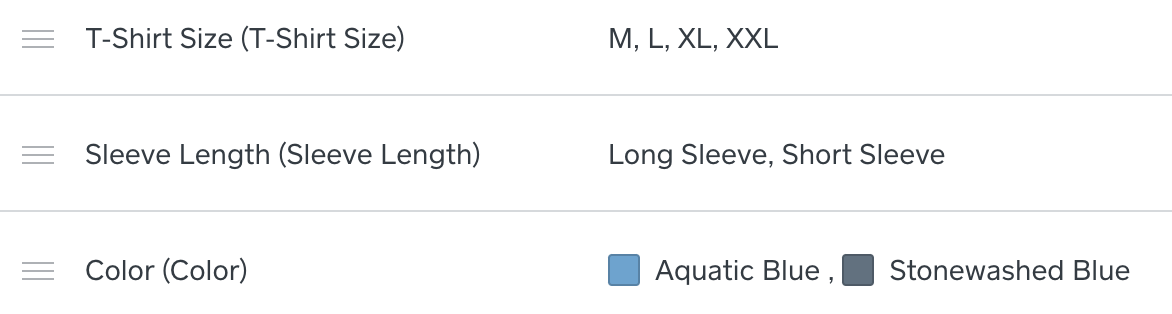
I hope this information is helpful!
Community Moderator, Square
Sign in and click Mark as Best Answer if my reply answers your question.
- Mark as New
- Bookmark
- Subscribe
- Subscribe to RSS Feed
- Permalink
- Report
- Subscribe to RSS Feed
- Mark Thread as New
- Mark Thread as Read
- Float this Thread for Current User
- Bookmark
- Subscribe
- Printer Friendly Page
Doing that seems to have now impact on the display order. Actually both items show the same options in the same order but are rendered in a different order than show on this page and different one from the next.
- Mark as New
- Bookmark
- Subscribe
- Subscribe to RSS Feed
- Permalink
- Report
- Subscribe to RSS Feed
- Mark Thread as New
- Mark Thread as Read
- Float this Thread for Current User
- Bookmark
- Subscribe
- Printer Friendly Page
- Mark as New
- Bookmark
- Subscribe
- Subscribe to RSS Feed
- Permalink
- Report
- Subscribe to RSS Feed
- Mark Thread as New
- Mark Thread as Read
- Float this Thread for Current User
- Bookmark
- Subscribe
- Printer Friendly Page
It turns out that controlling the order of options is not a feature that the site supports. A new feature request has been made so we'll see. Seems strange that this wouldn't be something already supported as it leads to a dissatisfying customer experience with options being rendered on a page in random (or at least not obvious) order.
- Mark as New
- Bookmark
- Subscribe
- Subscribe to RSS Feed
- Permalink
- Report

Square Community
Square Products