
- Home
- >
- Help
- >
- Online Store
- >
- Charging EHC Fees on Canned and Bottled Pop ("Bott...

- Subscribe to RSS Feed
- Mark Thread as New
- Mark Thread as Read
- Float this Thread for Current User
- Bookmark
- Subscribe
- Printer Friendly Page
Charging EHC Fees on Canned and Bottled Pop ("Bottle Deposit")
We're looking at selling canned pop and bottles in our shop, but in Saskatchewan where we are based, there is an Environmental Handling Charge that needs to be charged to a customer as a "bottle deposit". We're very early on figuring this all out, but I'd rather figure out the back end stuff now.
I played around in the modifiers and saw that I could easily add one based on type of pop (355ml can, 500ml bottle, 1L bottle, etc) as it's a different dollar amount for each one and set it as a default modifier based on the SKU being sold.
The thing I'm having problems with is that the bottle deposit is not taxed. Is there a way to have item modifiers that do not have the default tax applied to them from the product? I'd rather not have a separate sku that needs to be scanned by staff every time one is sold, especially if ordered from the online side of the business.



- Subscribe to RSS Feed
- Mark Thread as New
- Mark Thread as Read
- Float this Thread for Current User
- Bookmark
- Subscribe
- Printer Friendly Page
Hi again @getmyphoto 📷
I poked around and found this suggested workaround for bottle deposits - I hope it's helpful!
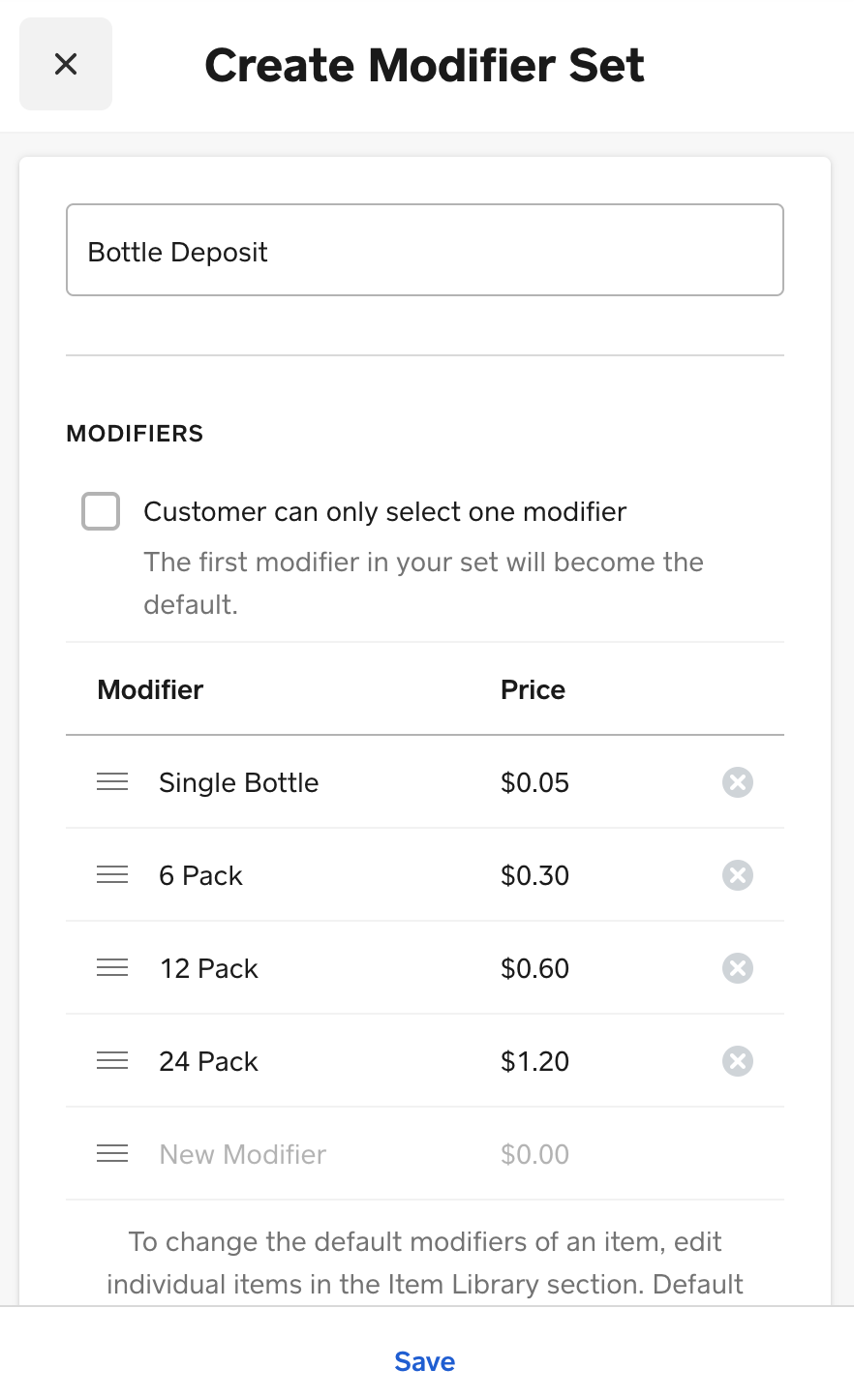
You can create a modifier set called Bottle Deposit, and enter in different choices with prices based upon the size of the container.
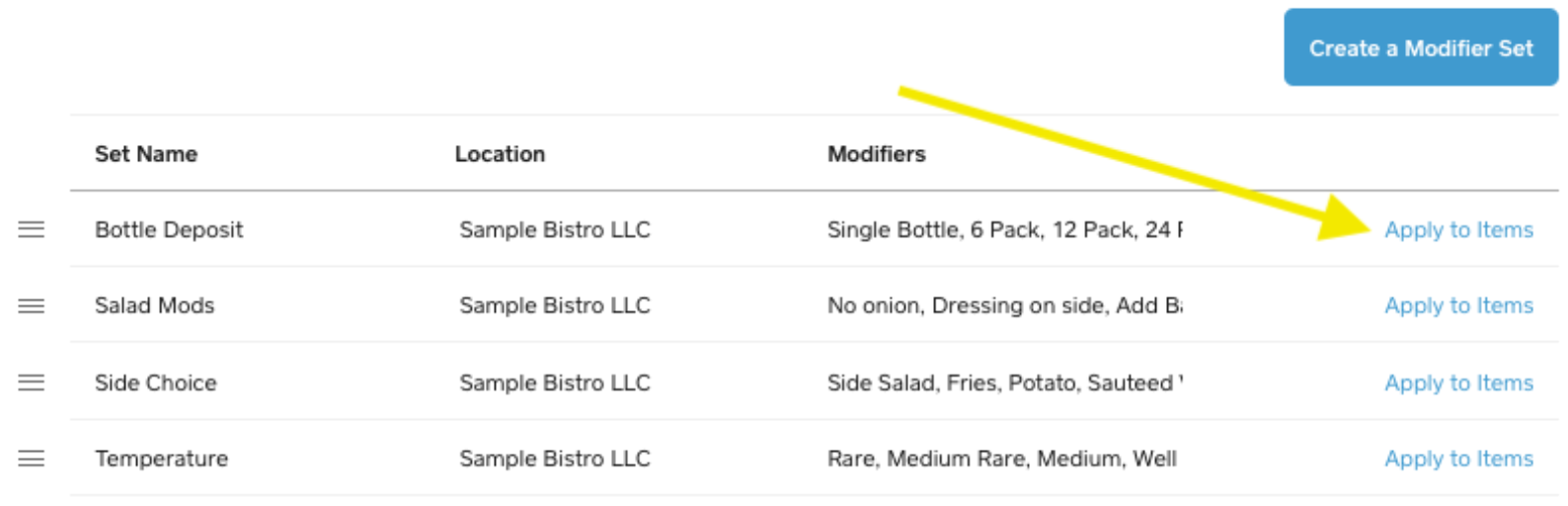
Apply the modifier set to all the items which require a bottle deposit by clicking Apply to Items in the Modifiers page.
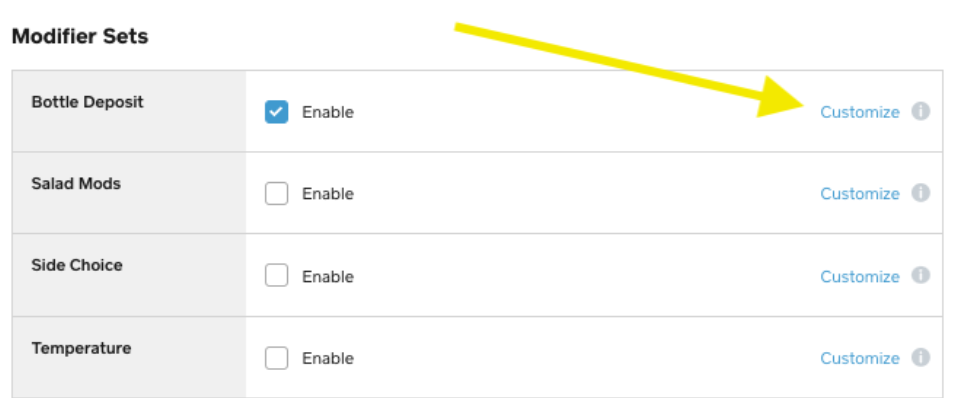
On the individual item level, scroll down to the modifiers area and then click Customize.
Here, you will be able to pre-select the correct modifier choice + click Save.
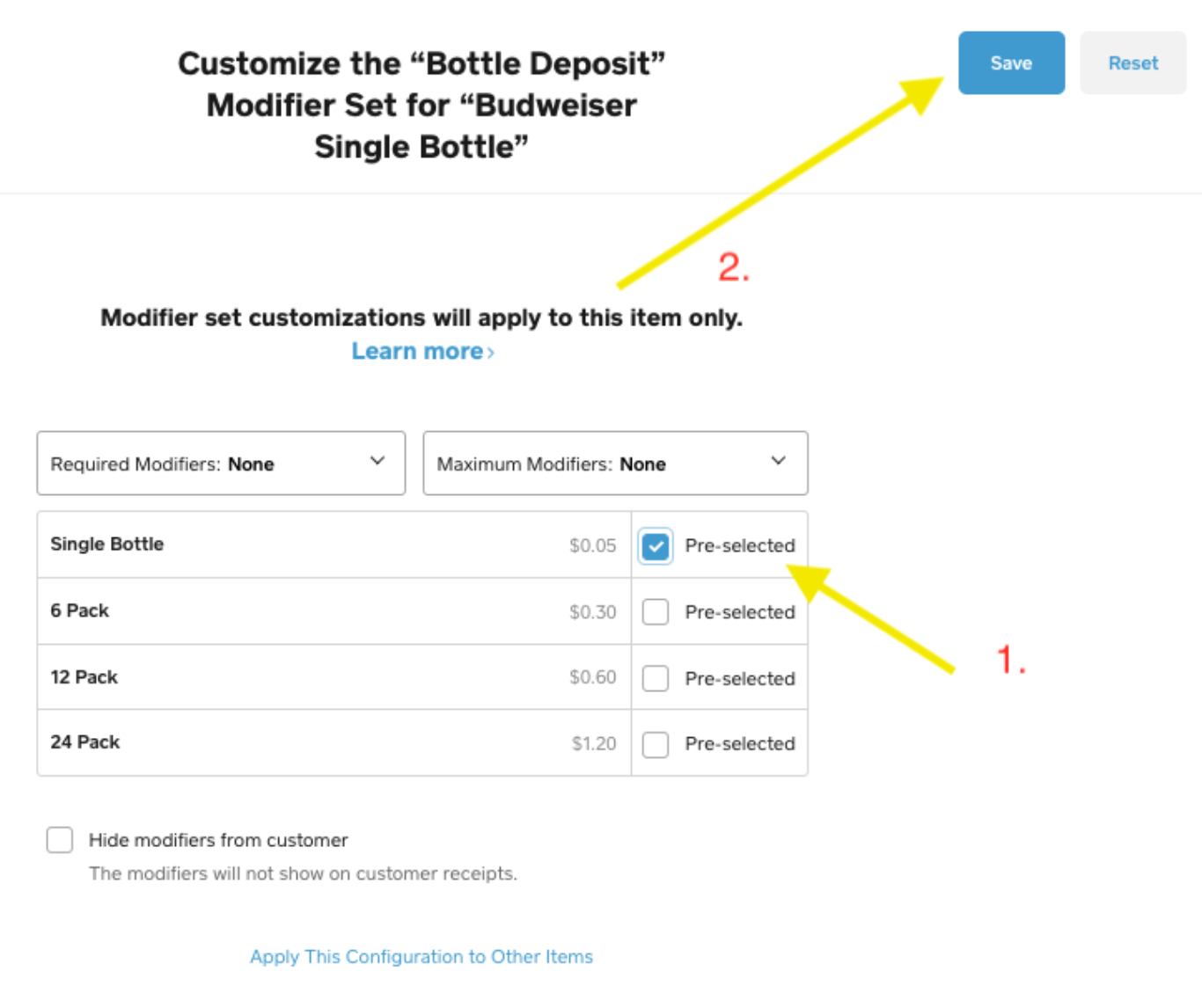
Now, whenever the item is selected via your Point of Sale, the corresponding bottle deposit price will automatically be applied to the item, eliminating the need to rely on employees to remember to add on the deposit to the sale.
*Note that since this is a modifier and NOT a tax, it is not included in the tax line item in the current sale.
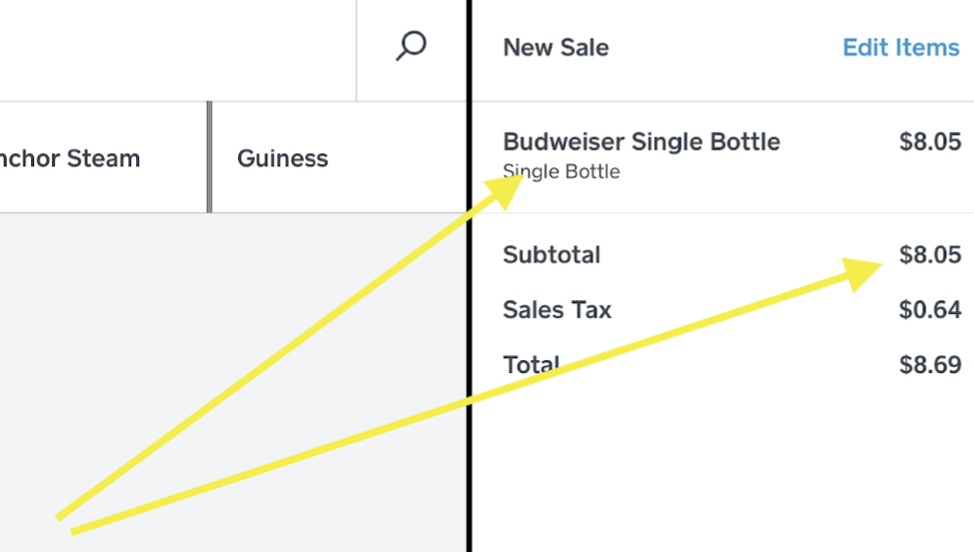
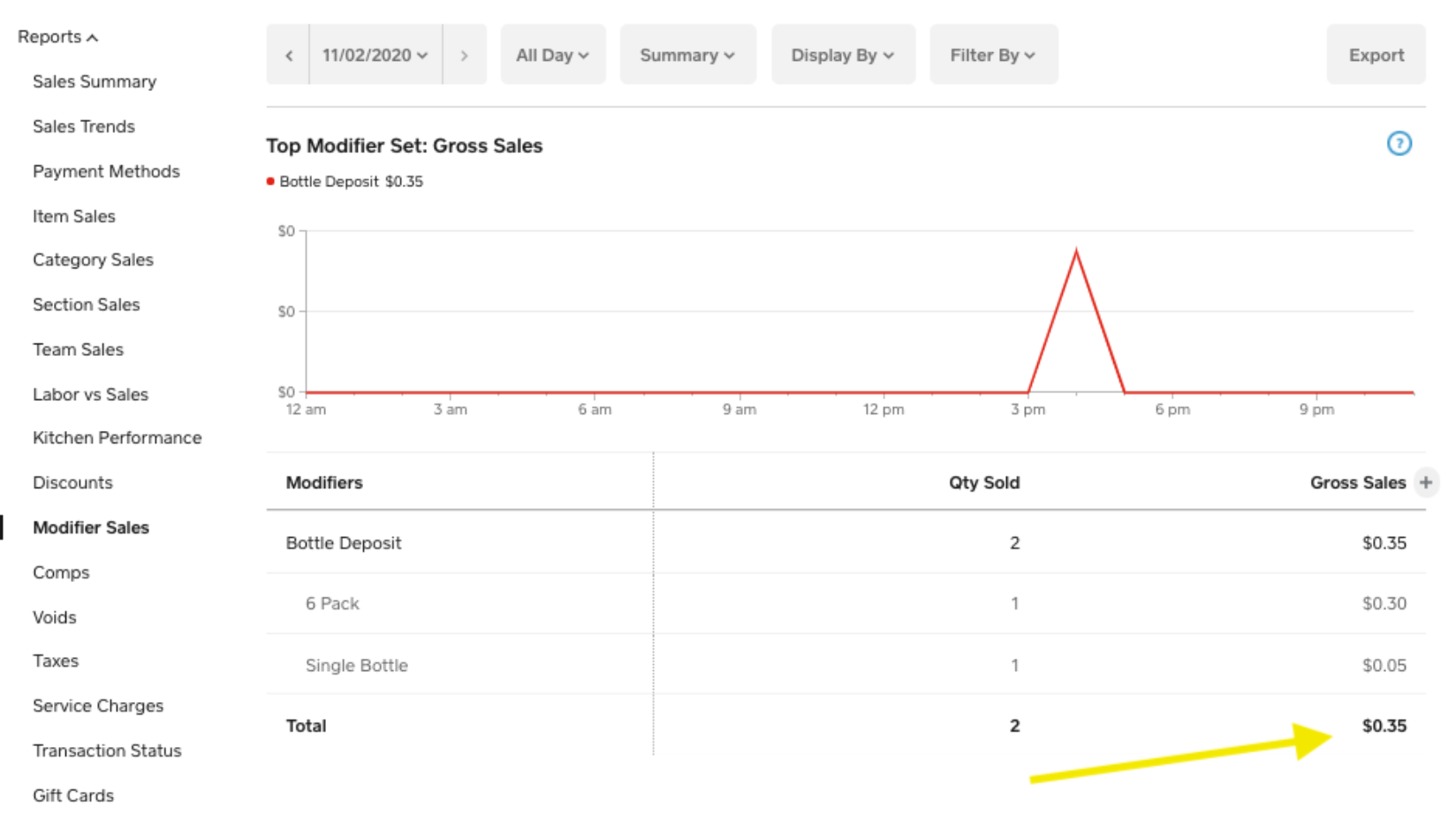
You can then check the total amount of bottle deposit collected during whichever time frame you choose by running a modifier sales report in your Dashboard:
To return the deposit when the buyer decides to bring back the containers, you could either
- Process a refund from the original transaction - if a card was used and it is within 180 days of the sale
OR
- You could use a Pay Out from the Cash Drawer session to give back the money in cash to the buyer.
In the app, go to Account > Cash Management > Pay In/Out
Once you end your drawer session in the app, you can check the total amount paid out for deposit refunds from your Dashboard > Reports > Cash Drawers > Click the drawer session in question. Here, you will be able to see your Pay Out totals for each drawer to track the amount of deposits going back to the buyers.
Please let us know if this isn't quite what you're looking for.
Community Moderator, Square
Sign in and click Mark as Best Answer if my reply answers your question.
- Subscribe to RSS Feed
- Mark Thread as New
- Mark Thread as Read
- Float this Thread for Current User
- Bookmark
- Subscribe
- Printer Friendly Page
Bottle deposits are not taxable. Is there a work around so the deposit is not charged?



- Subscribe to RSS Feed
- Mark Thread as New
- Mark Thread as Read
- Float this Thread for Current User
- Bookmark
- Subscribe
- Printer Friendly Page
I initially thoguht you could create a tax that would only apply to those items, but that is only available for % not $ - I would suggest a feature request on the ideate board. Tag me when you do and I will comment too as this is something we need to be able to do, because I am supposed to charge eco fees on batteries I sell, and currently do not sell them as a result of this limitation. I sell pet food and supplies, training collar batteries and light collar batteries are a potential revenue stream I ignore currently due to this


Square Community
Square Products