

- Subscribe to RSS Feed
- Mark Thread as New
- Mark Thread as Read
- Float this Thread for Current User
- Bookmark
- Subscribe
- Printer Friendly Page
Phone number prompt
Can anyone tell me if we can turn the phone number prompt off at the start of the POS? We do not wish to use this feature as we run a 1 (wo)man show at a time, but we all have different phone numbers, so do not wish to link the security feature to one phone number.
Thanks
- Mark as New
- Bookmark
- Subscribe
- Subscribe to RSS Feed
- Permalink
- Report



- Subscribe to RSS Feed
- Mark Thread as New
- Mark Thread as Read
- Float this Thread for Current User
- Bookmark
- Subscribe
- Printer Friendly Page
Hey there, @MGIC,
Thanks for reaching out with this question and welcome to the Seller Community! 👋
I just want to double-check that the prompt you're referring to is the one I've included below from my app.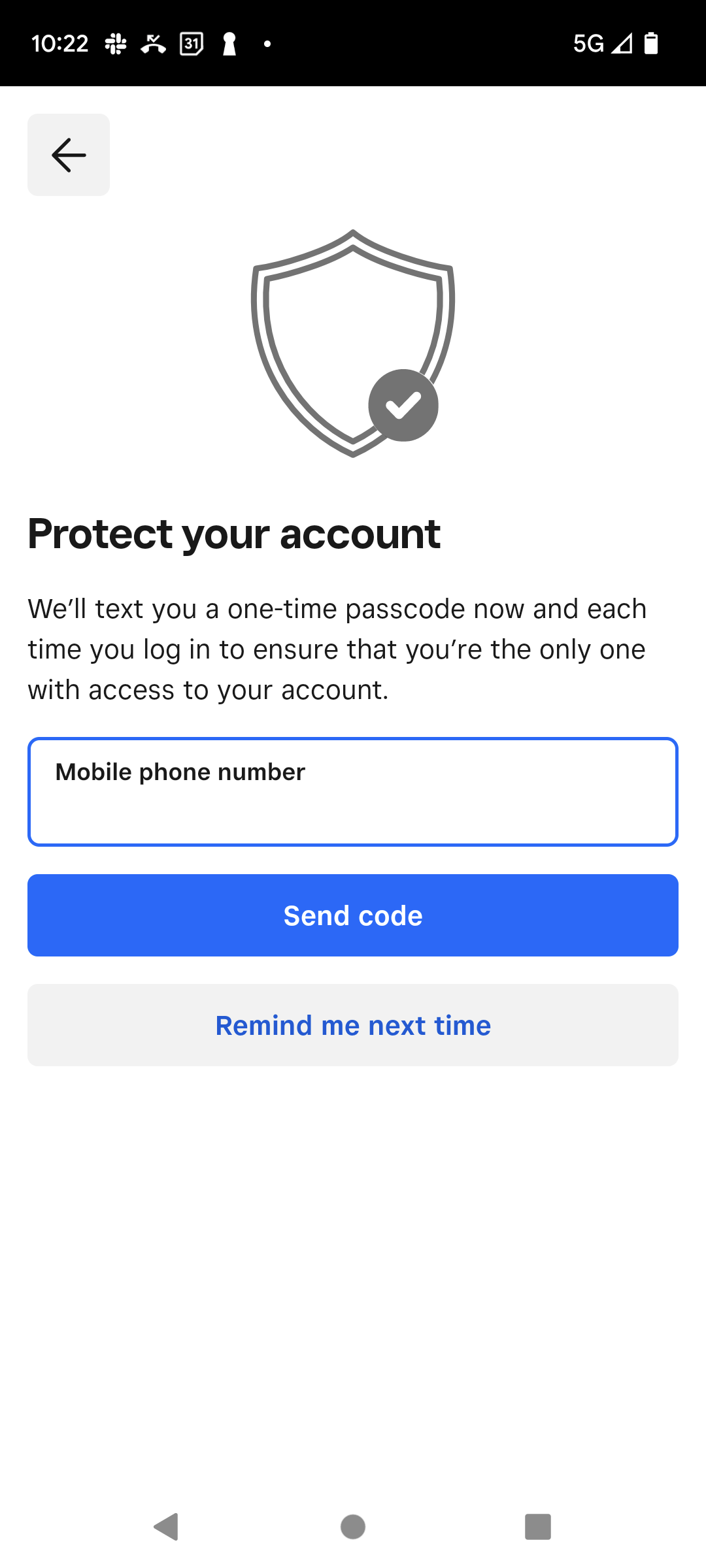
Community Moderator, Australia, Square
Sign in and click Mark as Best Answer if my reply answers your question.
- Mark as New
- Bookmark
- Subscribe
- Subscribe to RSS Feed
- Permalink
- Report
- Subscribe to RSS Feed
- Mark Thread as New
- Mark Thread as Read
- Float this Thread for Current User
- Bookmark
- Subscribe
- Printer Friendly Page
that’s the one Laurie
- Mark as New
- Bookmark
- Subscribe
- Subscribe to RSS Feed
- Permalink
- Report
- Subscribe to RSS Feed
- Mark Thread as New
- Mark Thread as Read
- Float this Thread for Current User
- Bookmark
- Subscribe
- Printer Friendly Page
Thanks for confirming, @MGIC.
There isn't a way to disable this alert currently. Each time you sign out and sign back into the Square account, you will be prompted with the above message.
Can I ask how you are all currently signing into the Square account? Are you logging in, for example, from a shared device or from your individual mobile devices?
It might be worthwhile to consider setting up Team Profiles so that you can log in as required without having to continuously skip the above message.
Have a look and let me know if you have any questions about this.
Community Moderator, Australia, Square
Sign in and click Mark as Best Answer if my reply answers your question.
- Mark as New
- Bookmark
- Subscribe
- Subscribe to RSS Feed
- Permalink
- Report
- Subscribe to RSS Feed
- Mark Thread as New
- Mark Thread as Read
- Float this Thread for Current User
- Bookmark
- Subscribe
- Printer Friendly Page
we don’t currently log in Laurie.
we are just a small family owned business and don’t require it.
there just needs to be a way to disable it please. If we add a phone number then that person needs to be available at all times with the given security code, and that just doesn’t work for us. We also use the same system at our small golf club and so not wish to have a single mobile number associated with our account as people come and leave the organisation.
We both use the Square stand with the built in EFTPOS.
- Mark as New
- Bookmark
- Subscribe
- Subscribe to RSS Feed
- Permalink
- Report
- Subscribe to RSS Feed
- Mark Thread as New
- Mark Thread as Read
- Float this Thread for Current User
- Bookmark
- Subscribe
- Printer Friendly Page
I appreciate the security you’re trying to implement but it would be nice to have an option to turn it off if not required.
- Mark as New
- Bookmark
- Subscribe
- Subscribe to RSS Feed
- Permalink
- Report
- Subscribe to RSS Feed
- Mark Thread as New
- Mark Thread as Read
- Float this Thread for Current User
- Bookmark
- Subscribe
- Printer Friendly Page
I see where you're coming from with this, @MGIC.
This prompt should only show in the event you have physically signed out of the Square Point of Sale app. If you have signed in on your device, and just closed the app, you shouldn't be seeing this prompt upon reopening the app again on the same device. I hope that makes sense!
The reason I asked how you plan to be logging in, and allowing others into the Square account, is because, through Team Management, you can allow individuals to create their own login on their own devices. This can also help to keep your Square account details safe, by granting permission only to the areas that are required (such as Checkout).
We explain how 2 Step Verification works for Team Members here. In short, the verification code would be sent to them and not to a single account number. You can learn how to get started with Team Manangement here. In your case, I suggest creating a Team Permission set and assigning this to each Team Profile.
Community Moderator, Australia, Square
Sign in and click Mark as Best Answer if my reply answers your question.
- Mark as New
- Bookmark
- Subscribe
- Subscribe to RSS Feed
- Permalink
- Report

Square Community
Square Products