

- Subscribe to RSS Feed
- Mark Thread as New
- Mark Thread as Read
- Float this Thread for Current User
- Bookmark
- Subscribe
- Printer Friendly Page
Square getting worse!
Square is somehow managing to make their software harder to use!
Today we no longer seem to be able to log in using our password manager.
Having to copy and paste complex passwords instead of using the password manager.
-Square is more interested in selling me a loan that I AM NOT INTERESTED IN!!!
-Interface is becoming more difficult to use.
-We can't set the name of the couriers that we ship with, only being given a list of American ones and having to manually enter our courier names EVERY TIME!
-Their webshop software is hopeless in comparison with the competition.
Etc, etc, etc.....
Evaluating other provider to move my business to....
- Mark as New
- Bookmark
- Subscribe
- Subscribe to RSS Feed
- Permalink
- Report



- Subscribe to RSS Feed
- Mark Thread as New
- Mark Thread as Read
- Float this Thread for Current User
- Bookmark
- Subscribe
- Printer Friendly Page
Hi @PeterPC,
@PeterPC wrote:Square is somehow managing to make their software harder to use!
Today we no longer seem to be able to log in using our password manager.
Having to copy and paste complex passwords instead of using the password manager.
I also noticed this today, bit annoying as we too have long passwords! It may just be a bug, so one of the friendly Square moderators may be able to assist @Seamus 😊
@PeterPC wrote:-Square is more interested in selling me a loan that I AM NOT INTERESTED IN!!!
You should be able to just close this (using the 'x' icon) on your dashboard if it's not of interest. I personally think Square's loan feature is awesome for small business in Australia!
@PeterPC wrote:-Interface is becoming more difficult to use.
Maybe share some specifics on the interface in here so Square can pass the feedback on to their developers to look into. The only thing I've noticed is the password thing.
@PeterPC wrote:-We can't set the name of the couriers that we ship with, only being given a list of American ones and having to manually enter our courier names EVERY TIME!
We have this setup for 'Sendle' in our Online > Shipping > Fullfillment > Shipping Profile > Name — is this where you're configuring yours? It's manual, but it should only have to be set once and can be used right across your store. Where are you having to set it every time?
@PeterPC wrote:-Their webshop software is hopeless in comparison with the competition.
As someone who uses (and has used) a range of competing platforms for e-com, Square has come a long way in the last 12 months. Personally we currently use Squarespace for our e-com (and Square for Appointments which we love). Squarespace is by no means perfect (no platform is). But we're now seriously considering simplifying our systems and going all in on Square Online for our e-com too (especially now Afterpay is built in).
What features are you struggling with specifically in the online aspect and maybe I can give you a hand? We've tried WordPress with WooCommerce (very buggy, costs add up with plugins and it requires lots of effort to keep it healthy), Shopify (way too expensive and complicated for our small business), Wix (garbage), and Squarespace (better priced compared to Shopify and some nice design features but still lacking obvious things that Square actually does have like better shipping profiles, better inventory management, better reporting, better connectivity to Xero etc etc).
We use Square with integrations for Xero by Amaka • Printful / We design, develop and implement Square with Squarespace • Shopify • WooCommerce • QuickBooks and more!
- Mark as New
- Bookmark
- Subscribe
- Subscribe to RSS Feed
- Permalink
- Report
- Subscribe to RSS Feed
- Mark Thread as New
- Mark Thread as Read
- Float this Thread for Current User
- Bookmark
- Subscribe
- Printer Friendly Page
Hi thanks for your reply, I wish Square cared as much!
We don't have a problem closing a loan popup, but you should not be annoyed by one just about every time that you're logging in trying to process an order.
When opening an order we used to have a full screen page but a few months ago Square decided to make it open on a small side of the window on the right of the page. We have 32" monitors so it looks ridiculous and doesn't seem to be a way to go back to full screen, but if I go back to see an existing order you can see it in full screen.
I have looked at the shipping options. It doesn't let you set the shipping options.
We ship for free from our webshop and when we get an order I need to create a shipping label in a different page because Square doesn't support the shipping companies that I use (Sendle, Australia Post).
When I mark the order as shipped I need to add tracking info from my shipping company but only gives me an option of American companies, no option to add or edit the list only an option to type your shipping company name as you add your tracking number. It doesn't save the shipping company name.
From memory, Square doesn't have their own webshop software and use Wix backend, or I don't remember being given any other options at the time.
- Mark as New
- Bookmark
- Subscribe
- Subscribe to RSS Feed
- Permalink
- Report
- Subscribe to RSS Feed
- Mark Thread as New
- Mark Thread as Read
- Float this Thread for Current User
- Bookmark
- Subscribe
- Printer Friendly Page
I actually meant Weebly not Wix.
- Mark as New
- Bookmark
- Subscribe
- Subscribe to RSS Feed
- Permalink
- Report
- Subscribe to RSS Feed
- Mark Thread as New
- Mark Thread as Read
- Float this Thread for Current User
- Bookmark
- Subscribe
- Printer Friendly Page
Hi @PeterPC,
Thanks for the extra info.
Re your order window, yes you're right, I guess I'm used to it because our Square Appointments have had this user interface for a while when you open individual appointments. We use an iPad most of the time, and it's full screen on that. I have noticed it can be tight on my MacBook Air which is only 13" when using the web browser. Hopefully @Seamus can raise your comments to Square's developers.
On the note of password manager not working, I can see there are a few posts about this and Square is well aware of it and looking into it. It's definitely a bug.
Re the shipping, I see what you mean. On our site, we've manually named our option 'Sendle' and it works okay. But in all honesty, we haven't fully moved over to Square Online as yet, but I've been testing it the last few weeks to hopefully start moving over shortly. We use Squarespace currently and have to use a third-party app called Ship Theory to enable Sendle support, but it's not perfect, only half the time does it work. Squarespace is the same, only has US carriers in there but Ship Theory sort of gets around it for us in Australia.
I've just done a bit of quick research for you, and found this similar Square supported App integration which may help: Square App Marketplace - Easyship (squareup.com). They have a free plan for up to 100 labels per month, and it looks like they support Australia Post and Sendle (and a bunch of other big ones like Aramex, Toll etc). Might be worth setting it up and giving it a go to see if that will solve the issue for you.
And yep you're 100% right about Weebly, Square bought them back in 2018, and in the 2 years we've been using Square products, it has had huuuuuge improvements. 12 months ago I wouldn't be considering Square Online at all, but early last year it had a massive makeover and has really added some compelling features that Squarespace still doesn't have (but Squarespace is great on the design front). Unfortunately none of these platforms are perfect, but Square is making leaps and bounds, so I'm excited to see what the future looks like for us Australian businesses (especially given their acquisition of Afterpay which really elevates Aussie businesses for them).
We use Square with integrations for Xero by Amaka • Printful / We design, develop and implement Square with Squarespace • Shopify • WooCommerce • QuickBooks and more!
- Mark as New
- Bookmark
- Subscribe
- Subscribe to RSS Feed
- Permalink
- Report
- Subscribe to RSS Feed
- Mark Thread as New
- Mark Thread as Read
- Float this Thread for Current User
- Bookmark
- Subscribe
- Printer Friendly Page
Thanks so much for your research
Not keen on a third party to handle shipping as I have tried a few over the years, and it only adds complications and costs for very little benefit.
Had a quick look at Easyship and after the hassle of giving them all my details to create an account, (so they can sell them on no doubt! ) just to add Australia Post to the options, I need to upgrade to the $50 a month. I don't think so.
Square should be able to integrate with Sendle and Australia Post like eBay does and Sendle integrates with other eCommerce software like Shopify, Squarespace, WooComerce, Etsy...
I will have another look at the web design improvements.
Thanks again for your help!
- Mark as New
- Bookmark
- Subscribe
- Subscribe to RSS Feed
- Permalink
- Report
- Subscribe to RSS Feed
- Mark Thread as New
- Mark Thread as Read
- Float this Thread for Current User
- Bookmark
- Subscribe
- Printer Friendly Page
Thanks for the info — sorry Easyship didn't hit the mark. As I said, Squarespace also doesn't support AusPost or Sendle so I feel your pain.
Give it time and I wouldn't be surprised if this is on Square's roadmap of updates — hopefully its soon!
We use Square with integrations for Xero by Amaka • Printful / We design, develop and implement Square with Squarespace • Shopify • WooCommerce • QuickBooks and more!
- Mark as New
- Bookmark
- Subscribe
- Subscribe to RSS Feed
- Permalink
- Report



- Subscribe to RSS Feed
- Mark Thread as New
- Mark Thread as Read
- Float this Thread for Current User
- Bookmark
- Subscribe
- Printer Friendly Page
Sorry for the delay getting back to you here @PeterPC and thank you for taking lead here @tomven! I've been out for a few days and just saw the notification for this post as I was going through my email.
Appreciate the additional context you've provided further down the page @PeterPC. There are a few things you've covered and I'll try to get to the bottom of them then pass on your feedback and/or provide advice where I can.
I'm interested in knowing more about this:
When opening an order we used to have a full screen page but a few months ago Square decided to make it open on a small side of the window on the right of the page. We have 32" monitors so it looks ridiculous and doesn't seem to be a way to go back to full screen, but if I go back to see an existing order you can see it in full screen.
Where are you viewing these orders, in terms of which Square interface is displaying the orders section on your 32" monitors? Orders can be viewed in a number of different places and they can look a little different depending on where you're viewing from. So I can try and see what you're referring to, is the source coming from your normal online dashboard on a web browser (which could be mobile or computer-based), the Square Online dashboard, the Point of Sale app (which itself can be iPhone, iPad, Android), Square for Restaurants, KDS etc? It's possible there may be a different way you might be able to view these orders, but let me know your current setup and we can start from there!
We can't set the name of the couriers that we ship with, only being given a list of American ones and having to manually enter our courier names EVERY TIME!
I get your frustration here as an Australian who also lives in a world of US-originating products adapted to our markets - things don't always work ultra smoothly, and I'm able to pass on feedback such as this up the chain - ultimately we want our products to make sense within their local markets.
I was able to save Australian carriers to the dropdown menu on orders, provided they are added from the Square Online overview:

Note that this will only work via the Square online overview (AKA the former Weebly backend that Square Online was initially based on) rather than the main Square Dashboard or our apps. I wasn't actually able to get the US carriers to display when I tested - are you currently using Square Online or Weebly Classic?
If you're looking for a more automated integration the one we recommend that works best with Square Online in Australia is Shippo, who integrate with both Aus Post and Sendle.
To @tomven's point, we do continually improve our products based on feedback from our sellers, and while we're not going to be everything to everyone, we do try and focus on making product improvements that are going to be the most impactful to the most number of sellers, based on feedback as well as a number of other factors. A good place to get a bit more insight into feature requests is in this thread.
In any case, let me know more about the above and anything else you're seeing 🙂
Square, Australia
Sign in and click Mark as Best Answer if my reply answers your question.
- Mark as New
- Bookmark
- Subscribe
- Subscribe to RSS Feed
- Permalink
- Report
- Subscribe to RSS Feed
- Mark Thread as New
- Mark Thread as Read
- Float this Thread for Current User
- Bookmark
- Subscribe
- Printer Friendly Page
Hi Seamus, thanks for your reply.
I'm using your square dashboard at squareup.com/dashboard/
Chrome web browser on a Windows 11 pc, 4k, 32" monitor.
I can't find the "ship items" window anywhere in square online overview.
You would think it would be logical to add a button to "add or edit" the courier list as you're shipping an item.
Not really looking for automated integration as I'm only a small business and not really interested in adding more complications and yet another company trying to charge me extra for something.
Can you guys please fix the bug in your web page login as it no longer works in chrome with Bitwarden password manager.
- Mark as New
- Bookmark
- Subscribe
- Subscribe to RSS Feed
- Permalink
- Report
- Subscribe to RSS Feed
- Mark Thread as New
- Mark Thread as Read
- Float this Thread for Current User
- Bookmark
- Subscribe
- Printer Friendly Page
Hi this is what the order page looks like in my monitor.
The second image is the add tracking information
If a click on "Other" only gives me the option to manually add the courier name but it doesn't save it.
This page should have an "Edit Carrier" button that would let you delete all the US carriers and add new ones.
On the positive note, my password manager is working properly again with Square! 🙂


- Mark as New
- Bookmark
- Subscribe
- Subscribe to RSS Feed
- Permalink
- Report
- Subscribe to RSS Feed
- Mark Thread as New
- Mark Thread as Read
- Float this Thread for Current User
- Bookmark
- Subscribe
- Printer Friendly Page
Hey @PeterPC,
Yep, it looks like the password manager bug has been fixed!
I'll pass on your feedback re: the dashboard. It's an interesting use case, I've not actually seen the Dashboard being used for order display purposes on a large screen before. The general intention of the dashboard is individual account management from a computer - are you using this as a way of displaying order info to a group of people, like in an office/kitchen/warehouse?
I'm afraid I'm still not seeing those US carriers - when I click on "Add Tracking Information" from the main Dashboard I get this:
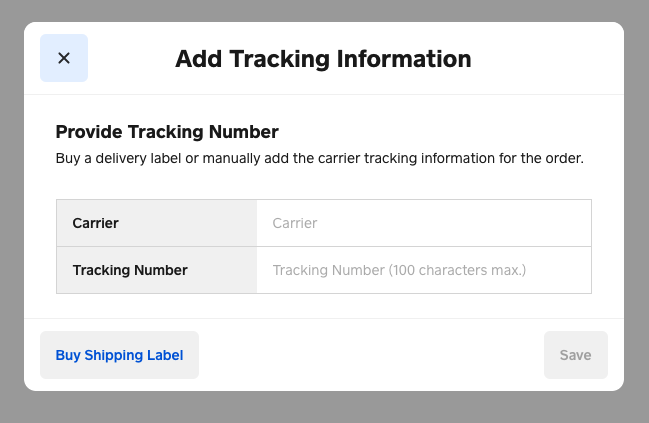
Whereas when I do it from the Square Online overview I get the ability to add carriers to the drop down as per my above post. It might be worth getting in touch with support for further help on this one! You can call our support team on 1800 760 137. Lines are open Mon-Fri, 9am-5pm Melbourne time. They will have much better insight into your account setup and will be able to take a look into the backend, which we're not able to do via our community forum.
Square, Australia
Sign in and click Mark as Best Answer if my reply answers your question.
- Mark as New
- Bookmark
- Subscribe
- Subscribe to RSS Feed
- Permalink
- Report
- Subscribe to RSS Feed
- Mark Thread as New
- Mark Thread as Read
- Float this Thread for Current User
- Bookmark
- Subscribe
- Printer Friendly Page
Called Square.
What a waste of time!
Spoke to support person "Nick" after explaining the annoying issues and getting him to log in into my account and confirming the issues.
He said that this is the way Square is setup to work and that he can't do anything about it!
I asked if I can use the "Weebly Classic" that "Seamus" mentioned instead and he said that it was not possible to change to it.
Asked if there was another way to use square on a PC like Windows app, etc... and he said logging in to the website the way I am doing is the only way.
"we do continually improve our products based on feedback from our sellers" Really????????????
- Mark as New
- Bookmark
- Subscribe
- Subscribe to RSS Feed
- Permalink
- Report

Square Community
Square Products