
- Home
- >
- Help
- >
- Your Square Account Information
- >
- How do I edit my taxpayer information?

- Subscribe to RSS Feed
- Mark Thread as New
- Mark Thread as Read
- Float this Thread for Current User
- Printer Friendly Page
Hi there!
I am just trying to enter some tax ID information and all but I can't seem to find the tax form tab to enter these information under account and settings and business tab anymore was wondering if this tax form tab was removed?
- Mark as New
- Subscribe to RSS Feed
- Permalink
- Report



- Subscribe to RSS Feed
- Mark Thread as New
- Mark Thread as Read
- Float this Thread for Current User
- Printer Friendly Page
Hi there, @Jessica_Dang 👋 Thanks for reaching out to us here on the Seller Community! Happy to have you in the fold.
I've gone ahead and merged your post into an existing thread of Sellers who were also looking for information regarding editing Taxpayer Information. You can find it hidden under the Business tab in your Account & Settings.
Here is a direct link to the editing page.
I hope that gets you where you need to be!
Community Moderator, Square
Sign in and click Mark as Best Answer if my reply answers your question.
- Mark as New
- Subscribe to RSS Feed
- Permalink
- Report
- Subscribe to RSS Feed
- Mark Thread as New
- Mark Thread as Read
- Float this Thread for Current User
- Printer Friendly Page
Hmmm... that's very interesting, @Jessica_Dang. There is no chance you are signing into the dashboard with an employee login and not the main account credentials, correct?
This space in the Business drop down would be the only place to make Taxpayer Information edits. It should look like this:
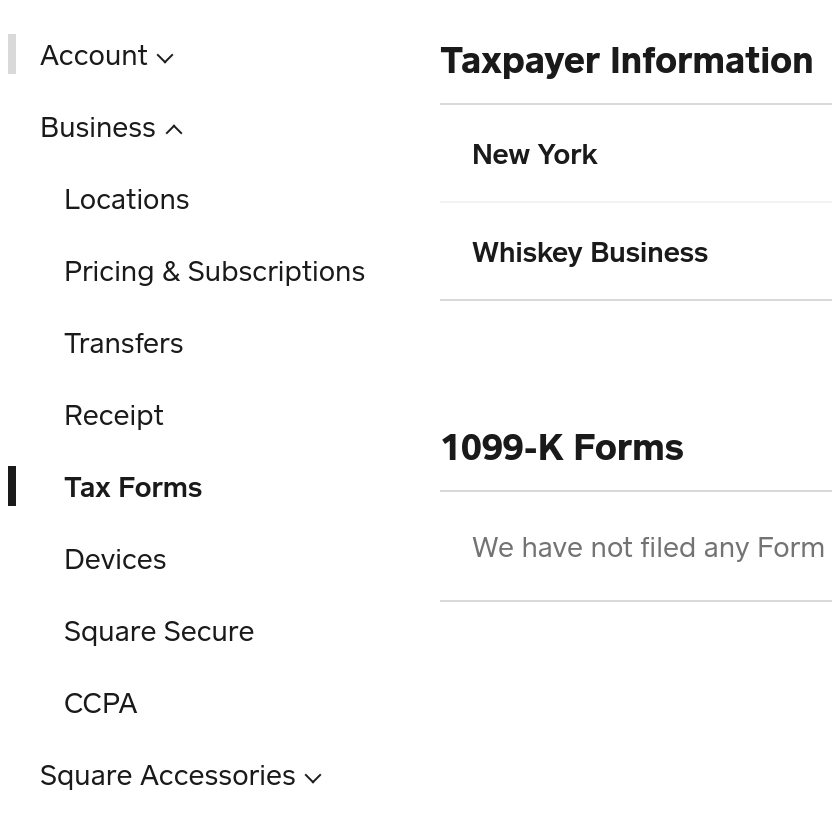
Feel free to also shoot me a screenshot of what you're seeing.
Community Moderator, Square
Sign in and click Mark as Best Answer if my reply answers your question.
- Mark as New
- Subscribe to RSS Feed
- Permalink
- Report



- Subscribe to RSS Feed
- Mark Thread as New
- Mark Thread as Read
- Float this Thread for Current User
- Printer Friendly Page
@Jessica_Dang this could be because you have a Canadian account and not a US account. We use the Tax Forms section to generate 1099-Ks for our sellers, but will not do that with Canadian accounts.
Community Moderator, Square
Sign in and click Mark as Best Answer if my reply answers your question.
- Mark as New
- Subscribe to RSS Feed
- Permalink
- Report
- Subscribe to RSS Feed
- Mark Thread as New
- Mark Thread as Read
- Float this Thread for Current User
- Printer Friendly Page
Hi there, @Jessica_Dang 👋 Thanks for reaching out to us here on the Seller Community! Happy to have you in the fold.
I've gone ahead and merged your post into an existing thread of Sellers who were also looking for information regarding editing Taxpayer Information. You can find it hidden under the Business tab in your Account & Settings.
Here is a direct link to the editing page.
I hope that gets you where you need to be!
Community Moderator, Square
Sign in and click Mark as Best Answer if my reply answers your question.
- Mark as New
- Subscribe to RSS Feed
- Permalink
- Report
- Subscribe to RSS Feed
- Mark Thread as New
- Mark Thread as Read
- Float this Thread for Current User
- Printer Friendly Page
Thank you for the response!
I followed the steps mentioned but I don't see it under the business tab in the account & settings was wondering if there's another way to put in tax information instead since the tab didn't show up for me when I checked
Thank you in advance!
- Mark as New
- Subscribe to RSS Feed
- Permalink
- Report
- Subscribe to RSS Feed
- Mark Thread as New
- Mark Thread as Read
- Float this Thread for Current User
- Printer Friendly Page
Hmmm... that's very interesting, @Jessica_Dang. There is no chance you are signing into the dashboard with an employee login and not the main account credentials, correct?
This space in the Business drop down would be the only place to make Taxpayer Information edits. It should look like this:
Feel free to also shoot me a screenshot of what you're seeing.
Community Moderator, Square
Sign in and click Mark as Best Answer if my reply answers your question.
- Mark as New
- Subscribe to RSS Feed
- Permalink
- Report
- Subscribe to RSS Feed
- Mark Thread as New
- Mark Thread as Read
- Float this Thread for Current User
- Printer Friendly Page
Hi there!
This is currently what I've been seeing and I have full access to the account so not under staff account, I was wondering if I can put in the tax payer information in the GST/HST number instead under Receipt?

- Mark as New
- Subscribe to RSS Feed
- Permalink
- Report
- Subscribe to RSS Feed
- Mark Thread as New
- Mark Thread as Read
- Float this Thread for Current User
- Printer Friendly Page
@Jessica_Dang this could be because you have a Canadian account and not a US account. We use the Tax Forms section to generate 1099-Ks for our sellers, but will not do that with Canadian accounts.
Community Moderator, Square
Sign in and click Mark as Best Answer if my reply answers your question.
- Mark as New
- Subscribe to RSS Feed
- Permalink
- Report
- Subscribe to RSS Feed
- Mark Thread as New
- Mark Thread as Read
- Float this Thread for Current User
- Printer Friendly Page
Thank you for the clarifications!

Square Community
Square Products