
Turn on suggestions
Auto-suggest helps you quickly narrow down your search results by suggesting possible matches as you type.
Showing results for
- Home
- >
- Community Hub
- >
- Community Corner
- >
- Setting up my page. How do I edit and add feature...

Julie61
07-31-2022
09:39 PM
Thread Options
- Subscribe to RSS Feed
- Mark Thread as New
- Mark Thread as Read
- Float this Thread for Current User
- Bookmark
- Subscribe
- Printer Friendly Page
Setting up my page. How do I edit and add features to it?
So my page says it’s published. There’s nowhere to click for different categories… things like About Me, my drawings, ask for a quote…,gallery..,
Reply
- Mark as New
- Bookmark
- Subscribe
- Subscribe to RSS Feed
- Permalink
- Report
1 REPLY 1


Arie

07-31-2022
11:24 PM
Thread Options
- Subscribe to RSS Feed
- Mark Thread as New
- Mark Thread as Read
- Float this Thread for Current User
- Bookmark
- Subscribe
- Printer Friendly Page
Hello and welcome to our community @Julie61 👋
You can edit your site, add categories and pages, as well as contact forms and more to your website at any time by logging into your website editor on your dashboard. Sign in here and select Website > Edit Site.
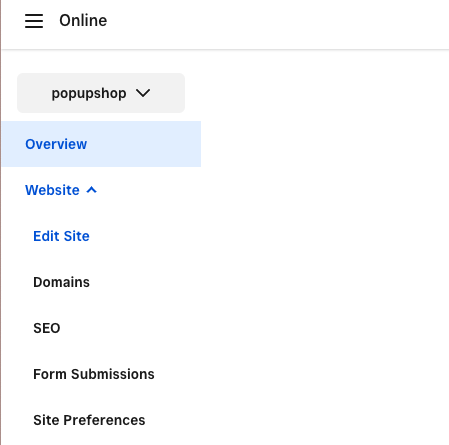
We also have some guides you might find useful. Learn more about creating pages and navigation here, and adding a contact form here. Please let us know how you go!
As always, feel free to stop by The Community with questions, concerns and even feature requests. We are more than happy to assist. ✨
Reply
- Mark as New
- Bookmark
- Subscribe
- Subscribe to RSS Feed
- Permalink
- Report

Square Community
© 2026 Square, Inc.