
- Home
- >
- Help
- >
- Appointments
- >
- Data missing in Google Sync

- Subscribe to RSS Feed
- Mark Thread as New
- Mark Thread as Read
- Float this Thread for Current User
- Bookmark
- Subscribe
- Printer Friendly Page
Data missing in Google Sync
I sync my Appoinments wiht Google but notice the cusomers address never syncs. Ish there a way to include it? It currently defaults to my address.
- Mark as New
- Bookmark
- Subscribe
- Subscribe to RSS Feed
- Permalink
- Report



- Subscribe to RSS Feed
- Mark Thread as New
- Mark Thread as Read
- Float this Thread for Current User
- Bookmark
- Subscribe
- Printer Friendly Page
Hey there @TCEPressureWash in order to have your customer's address synced you would need to make sure that your Appointment Settings reflect that you are looking to visit your customer's address
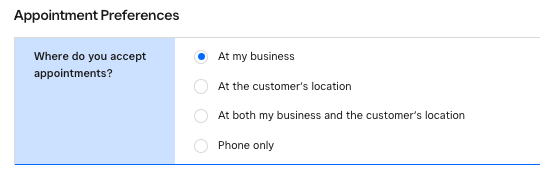
Here you would select At the customer's location if you would like the Customer address to be included in the appointment.
I hope this information is helpful!
Community Moderator, Square
Sign in and click Mark as Best Answer if my reply answers your question.
- Subscribe to RSS Feed
- Mark Thread as New
- Mark Thread as Read
- Float this Thread for Current User
- Bookmark
- Subscribe
- Printer Friendly Page
Thank you JJ. Makes sense
- Mark as New
- Bookmark
- Subscribe
- Subscribe to RSS Feed
- Permalink
- Report
- Subscribe to RSS Feed
- Mark Thread as New
- Mark Thread as Read
- Float this Thread for Current User
- Bookmark
- Subscribe
- Printer Friendly Page
Hey there @TCEPressureWash in order to have your customer's address synced you would need to make sure that your Appointment Settings reflect that you are looking to visit your customer's address
Here you would select At the customer's location if you would like the Customer address to be included in the appointment.
I hope this information is helpful!
Community Moderator, Square
Sign in and click Mark as Best Answer if my reply answers your question.
- Subscribe to RSS Feed
- Mark Thread as New
- Mark Thread as Read
- Float this Thread for Current User
- Bookmark
- Subscribe
- Printer Friendly Page
Thank you JJ. Makes sense
- Mark as New
- Bookmark
- Subscribe
- Subscribe to RSS Feed
- Permalink
- Report

Square Community
Square Products