- Subscribe to RSS Feed
- Mark Thread as New
- Mark Thread as Read
- Float this Thread for Current User
- Printer Friendly Page
Square appointment Calendar time zone (CST) differs from business time zone (EST). How can I change the appointment calenar time zone from CST to EST. Thanks
- Mark as New
- Subscribe to RSS Feed
- Permalink
- Report
- Subscribe to RSS Feed
- Mark Thread as New
- Mark Thread as Read
- Float this Thread for Current User
- Printer Friendly Page
While looking for your answer I came across these suggested troubleshooting steps so hopefully, they'll help.
- Check the time zone for the affected client from their Client Profile.
- Check the time zone settings in the Locations tab of the Account & Settings menu.
- Check the time and date settings on your mobile device or computer from System Preferences.
- If you’re using the Appointments app, delete and reinstall it.
If you have not been able to fix the issue after attempting these steps, I would highly recommend getting in contact with our Support team directly so that we can investigate this further.
- Mark as New
- Subscribe to RSS Feed
- Permalink
- Report
- Subscribe to RSS Feed
- Mark Thread as New
- Mark Thread as Read
- Float this Thread for Current User
- Printer Friendly Page
While looking for your answer I came across these suggested troubleshooting steps so hopefully, they'll help.
- Check the time zone for the affected client from their Client Profile.
- Check the time zone settings in the Locations tab of the Account & Settings menu.
- Check the time and date settings on your mobile device or computer from System Preferences.
- If you’re using the Appointments app, delete and reinstall it.
If you have not been able to fix the issue after attempting these steps, I would highly recommend getting in contact with our Support team directly so that we can investigate this further.
- Mark as New
- Subscribe to RSS Feed
- Permalink
- Report
- Subscribe to RSS Feed
- Mark Thread as New
- Mark Thread as Read
- Float this Thread for Current User
- Printer Friendly Page
It was totally the time zone under the client that was saying the time was wrong.... but how would I know that's different. What if there are others that I am sending the wrong time for and have no idea?
- Mark as New
- Subscribe to RSS Feed
- Permalink
- Report
- Subscribe to RSS Feed
- Mark Thread as New
- Mark Thread as Read
- Float this Thread for Current User
- Printer Friendly Page
Hey @nishasupahan!
Your client's time zone is determined when they book an appointment from your online booking site. After they select a service and date they click on the time zone (see arrow below for PDT) to change it.
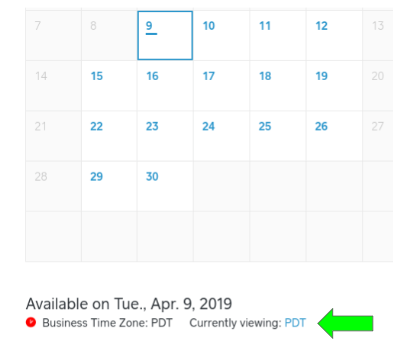
You can then view a client's time zone from their profile in the online Customer Directory. Click on a customer's name > their time zone will appear in the Personal Information section.
If needed, our Appointments team can set all of your clients' time zones to match yours! If that would help you please reply here to let me know and confirm your timezone and I'll submit that request for you.
Seller Community Manager
- Mark as New
- Subscribe to RSS Feed
- Permalink
- Report
- Subscribe to RSS Feed
- Mark Thread as New
- Mark Thread as Read
- Float this Thread for Current User
- Printer Friendly Page
This reply was created from merging an existing thread: Square appointment booking one hour off
I have one particular client (that I am aware of) that books an appointment and it is off an hour. She typically books from another time zone when traveling as do a few of my clients but she is the only one that this happens to every time.
Example:
Booked for an appointment on 2pm, I confirm.
Shows up at 3pm and it reflects 3pm on her end.
- Mark as New
- Subscribe to RSS Feed
- Permalink
- Report
- Subscribe to RSS Feed
- Mark Thread as New
- Mark Thread as Read
- Float this Thread for Current User
- Printer Friendly Page
Hello @TGR22! As I mentioned in this thread, each client's time zone is determined by their device at the time they book their appointment. Can you ask her to check what time zone appears when she's booking?
If she is switching the time but it's not saving, go ahead and call our CS team so they can investigate why her appointments aren't set to the correct time!
Seller Community Manager
- Mark as New
- Subscribe to RSS Feed
- Permalink
- Report
- Subscribe to RSS Feed
- Mark Thread as New
- Mark Thread as Read
- Float this Thread for Current User
- Printer Friendly Page
I don't have the online booking site enabled...
- Mark as New
- Subscribe to RSS Feed
- Permalink
- Report
- Subscribe to RSS Feed
- Mark Thread as New
- Mark Thread as Read
- Float this Thread for Current User
- Printer Friendly Page
Hey @nishasupahan - I would double check your time zone for your location. VanKalkerFarms' post above provides the steps on how to do this. If that doesn't work, can you provide more information on where exactly you are seeing the wrong time zone?
Seller Community UX Designer
- Mark as New
- Subscribe to RSS Feed
- Permalink
- Report
- Subscribe to RSS Feed
- Mark Thread as New
- Mark Thread as Read
- Float this Thread for Current User
- Printer Friendly Page
I did totally checked the time zone and it's correct for our location. I was scheudling an appointment for someone and they said it was the wrong time (when they got the confirmation text). After it happened a couple times I checked their client account and their name was under the wrong timezone. My concern is, if other people are under different time zones, I have no idea and then I will send them the wrong appointment time.
- Mark as New
- Subscribe to RSS Feed
- Permalink
- Report
- Subscribe to RSS Feed
- Mark Thread as New
- Mark Thread as Read
- Float this Thread for Current User
- Printer Friendly Page
Hmm that's strange @nishasupahan. Do you book appointments from one device or from different devices? Have you checked the time zone settings on each? It might also be worthwhile calling our CS team so an Appointments specialist can check the client's history to see what happened. They can also reset all of your clients' time zones to match your business. Alternatively, I can start an email case for you with the team - just let me know!
Seller Community Manager
- Mark as New
- Subscribe to RSS Feed
- Permalink
- Report
- Subscribe to RSS Feed
- Mark Thread as New
- Mark Thread as Read
- Float this Thread for Current User
- Printer Friendly Page
Hi, can you fix my time zone please. It should be Eastern but showing on the emails as pacific so its changing the appt time in the reminder 😭 I have tried all the ways they recommended to fix it and its not working
- Mark as New
- Subscribe to RSS Feed
- Permalink
- Report
- Subscribe to RSS Feed
- Mark Thread as New
- Mark Thread as Read
- Float this Thread for Current User
- Printer Friendly Page
Hey there, @SaraRose -
Welcome to the Community!
What kind of email is the time showing incorrectly on - appointments confirmation, invoice, or something different?
Double check the Timezone settings under your Location on your Dashboard too. Sometimes that one is overlooked.
If that all checks out then, I am going to recommend reaching out to our CS Team directly, so they can file a ticket with our engineers. They will be able to take a deep dive into the issue.
Community Moderator, Square
Sign in and click Mark as Best Answer if my reply answers your question.
- Mark as New
- Subscribe to RSS Feed
- Permalink
- Report
- Subscribe to RSS Feed
- Mark Thread as New
- Mark Thread as Read
- Float this Thread for Current User
- Printer Friendly Page
Hi im having issues with my clients and I time zone they are not aligned please help!!
- Mark as New
- Subscribe to RSS Feed
- Permalink
- Report
- Subscribe to RSS Feed
- Mark Thread as New
- Mark Thread as Read
- Float this Thread for Current User
- Printer Friendly Page
Hi @elegantbeauty,
Did you already go through the troubleshooting steps listed above?
If so it might be best to contact our direct Appointments team who can take a closer look.
Community Moderator, Square
Sign in and click Mark as Best Answer if my reply answers your question.
- Mark as New
- Subscribe to RSS Feed
- Permalink
- Report
- Subscribe to RSS Feed
- Mark Thread as New
- Mark Thread as Read
- Float this Thread for Current User
- Printer Friendly Page
Yes, I’ve checked it all but every time they go to book the appointment they’re in different time zones and doesn’t link up with what I have on my time zone.
- Mark as New
- Subscribe to RSS Feed
- Permalink
- Report
- Subscribe to RSS Feed
- Mark Thread as New
- Mark Thread as Read
- Float this Thread for Current User
- Printer Friendly Page
Hi my time zone is Atlantic daylight time zone
- Mark as New
- Subscribe to RSS Feed
- Permalink
- Report
- Subscribe to RSS Feed
- Mark Thread as New
- Mark Thread as Read
- Float this Thread for Current User
- Printer Friendly Page
I need help to changing it to Atlantic time zone so my clients can book appointments
- Mark as New
- Subscribe to RSS Feed
- Permalink
- Report
- Subscribe to RSS Feed
- Mark Thread as New
- Mark Thread as Read
- Float this Thread for Current User
- Printer Friendly Page
Hi @MCS2Roots Thanks for reaching out. 🙂
There's some troubleshooting steps in this thread you can try out. If you have already checked all of your settings, and everything looks good from your end, I recommend reaching out to our team here so they can investigate further.
- Mark as New
- Subscribe to RSS Feed
- Permalink
- Report
- Subscribe to RSS Feed
- Mark Thread as New
- Mark Thread as Read
- Float this Thread for Current User
- Printer Friendly Page
Thank you
- Mark as New
- Subscribe to RSS Feed
- Permalink
- Report
- Subscribe to RSS Feed
- Mark Thread as New
- Mark Thread as Read
- Float this Thread for Current User
- Printer Friendly Page
Can you please help me with this? I have had multiple clients book with mst/est time zones! Some say they have recently traveled, others say they haven’t and it still happened. I am PST!
- Mark as New
- Subscribe to RSS Feed
- Permalink
- Report
- Subscribe to RSS Feed
- Mark Thread as New
- Mark Thread as Read
- Float this Thread for Current User
- Printer Friendly Page
Hi @Keilani001 - Welcome back to The Seller Community, it's always nice when you stop by 😊
Great Question.
When customers book an appointment through your online booking site, you can (1) allow customers to choose their time zone or (2) lock the booking time zone to your business time zone. To do so: Navigate to the Appointments section of your online Square Dashboard.
Learn more about Client-Facing Online Booking Tools here.
I hope this helps.
As always, feel free to stop by The Community with question, concerns and even feature requests. We are more than happy to assist. ✨
Community Moderator, Square
Sign in and click Mark as Best Answer if my reply answers your question.
- Mark as New
- Subscribe to RSS Feed
- Permalink
- Report
